

Forum Replies Created
-
AuthorPosts
-
Vadim Smirnov
KeymasterЕще обнаружил следующую проблему. Клиентом является Win2008R2+IIS ftp server + IIS web server. Если сервис стартует без -lac (wiresock-client.exe install -start-type 2 -config wg1.conf -log-level none), то при обращении со стороны wg интерфейса к ftp серверу в passive mode соединение крэшится, аналогично при обращении к web серверу. Если сервис стартует с -lac (wiresock-client.exe install -start-type 2 -config wg1.conf -log-level none -lac), то проблемы не наблюдается.
Если не затруднит, то не помешали бы подробности. Если я правильно понимаю, то вы пытаетесь получить доступ к указанным сервисам через туннель? Что значит соединение крешится? Не устанавливается или работает и рвется через какое-то время?
Режимы с виртуальным адаптером и без довольно сильно отличаются, во втором случае никакого дополнительного сетевого интерфейса в системе нет, весь трафик идет с дефолтового интерфейса и нужный упаковывается в туннель после NAT (адрес источника подменяется на адрес из конфига). В обратную сторону трафик распаковывается из туннеля и снова проходит через NAT (теперь адрес назначения меняется на реальный локальный сетевой адрес).
Хотелось-бы чтобы инициировал с заданным в конфиге портом, официальный клиент так делает, в некоторых случаях это удобно.
Это в принципе не сложно, если адрес свободен. Можно будет добавить в следующей версии.
KeymasterДень добрый!
Не могу понять, вопрос о клиенте Wiresock? Клиент не слушает какой-либо специфический порт и функционирует только как клиент (инициатор туннеля), параметр keepalive передается в BoringTun, который периодически отправляет пакеты keepalive. В принципе, хотя из интерфейса библиотеки это и неочевидно, BoringTun позволяет реализовать и серверную часть (принимать соединения). Возможно, займусь как-нибудь если будет свободное время, тема в основном смежная с поддержкой множественных туннелей.
KeymasterThe feasibility of this depends on the application in question. If you’re able to rename the second instance or relocate it to a different path (such as a portable edition), you can still use the “AllowedApps” option by specifying the full pathname. For example, you could set “AllowedApps = C:\Program Files\Mozilla Firefox\firefox.exe”.
However, if the only difference between your application instances is the process ID, unfortunately, this feature is not supported. While it’s technically feasible to implement, I’m currently unsure of how to do so in a user-friendly manner.
KeymasterThe current Wiresock VPN Client does not support local Wireguard endpoints in the configuration file, rendering the method of redirecting WireGuard through the local proxy, as described in the provided link, unfeasible. I’m contemplating the inclusion of local endpoints as a feature, however, this isn’t necessary for your specific situation.
You can simply specify the applications you want to forward over the Wireguard tunnel under the “AllowedApps” configuration option. For instance, setting “AllowedApps = firefox” will result in only the Firefox browser’s traffic being forwarded over the WireGuard tunnel.
If you prefer to have your browser explicitly configured to use the specified local proxy, you can install a lightweight SOCKS5 proxy and include its name in the “AllowedApps”. Consequently, all outgoing traffic from this proxy will be directed through Wiresock over the WireGuard tunnel. This setup will also apply to all traffic from the proxy’s clients.
KeymasterВ логах anti-spam’а я не нашел ничего релевантного, затрудняюсь сказать, что ему не понравилось. Но без него тоже никак, вручную текущие объёмы спама модерировать невозможно. Можете отправить мне напрямую на [email protected].
Установить драйвер получилось или опять ACCESS_DENIED? Такое ощущение, что что-то в системе блокирует установку определенного типа драйверов…
KeymasterЯсно, конcоль была запущена под админом? А если так как на скриншоте попробовать?
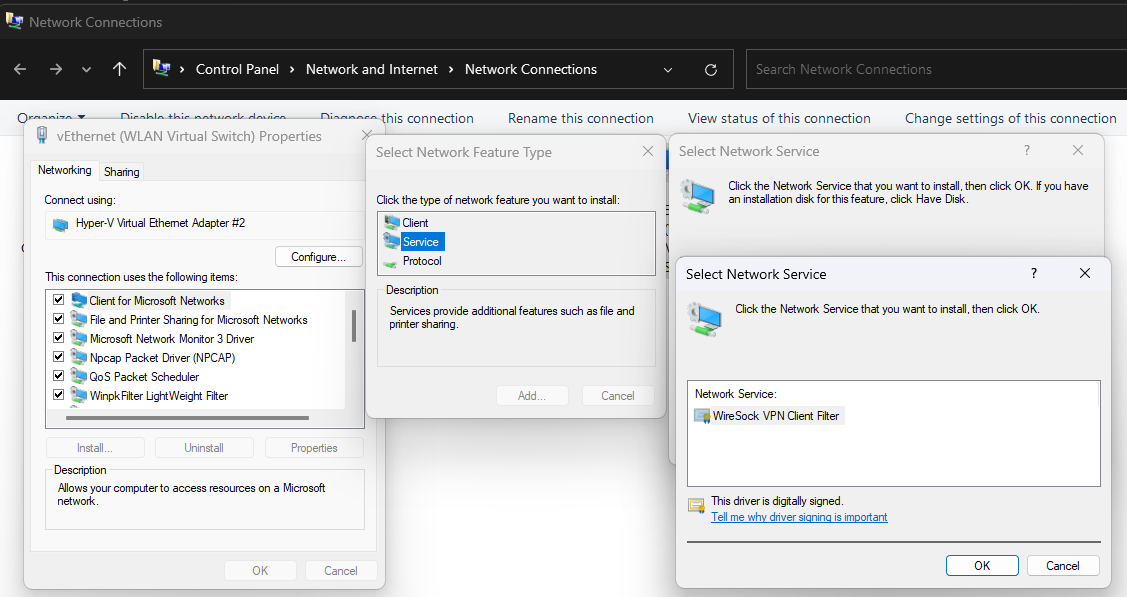 Keymaster
Может в “роллбеке” msi, при неудачной инсталляции указывать именно удаление через sc? Потому что через “‘C:\WINDOWS\system32\netcfg.exe” -v -u nt_ndisrd’ не отработало и в системе остался не запускающийся драйвер:
Да, пожалуй имеет смысл. Но сперва надо разобраться с ACCESS_DENIED.
Если не затруднит, скачайте ndiswgc и попробуйте установить его вручную, либо используя netcfg:
netcfg.exe -v -l ndiswgc_lwf.inf -c s -i nt_ndiswgcЛибо через свойства сетевого соединения, Install->Service->Have a Disk.
Если при установке в ручную ошибки не будет, то дело в MSI скрипте, будем разбираться что с ним не так.
KeymasterDNS reserves a significant range of ports, the specifics of which you can explore here: DNS Port Allocation. It would be advisable to select a different range when assigning a port for WireGuard.
KeymasterThe purpose of this DPI protection is to mask the WireGuard handshake from the DPI system that sits between the WireGuard peers.
KeymasterThe log says: Could not bind socket to [::]:59539 (0xc0000043)
From the error messages provided, it seems like there is a conflict on port 59539, which WireSock is trying to bind to. The error message “The process cannot access the file because it is being used by another process” often means that the port is being used by another application or service on the system.
I would recommend trying to identify the application using the port. Use the
netstatcommand to identify which application is currently using the port 59539. Open the Command Prompt and typenetstat -aon | findstr 59539. The last column of the output will give you the process ID (PID) of the application using the port. You can then use the Task Manager to find the application associated with this PID.KeymasterI’m not entirely sure if I have accurately comprehended your question. The premise seems to be that when tunneling the Wireguard handshake via SOCKS5, Deep Packet Inspection (DPI) will observe the handshake and handshake response packets with an additional SOCKS5 header appended. This extra layer increases the complexity of accurately identifying the nature of these packets.
KeymasterCould you please start the service with verbose logging enabled
-log-level alland share the log?KeymasterHmm, it might be beneficial for you to consider utilizing the command line version of the WireSock VPN Client. This allows you the flexibility to start or stop the client either as a standalone application or as a service, directly from a PowerShell script.
KeymasterYes, you’re absolutely correct. The SOCKS5 proxy should indeed be remote, preferably residing on the same machine as the VPN server. This configuration ensures it is beyond the DPI (Deep Packet Inspection), thus facilitating pass-through.
KeymasterApologies for the oversight in our documentation update. The new log location is
C:\ProgramData\NT KERNEL\WireSock VPN Client. PCAP files are saved either to the working directory or within Windows\System32 when operating as a service. -
AuthorPosts