

Forum Replies Created
-
AuthorPosts
-
Vadim Smirnov
KeymasterIt seems there might be a misconfiguration. The newly added WireSock adapter shouldn’t act as the default gateway; it’s intended for incoming VPN connections. Could you please provide the output of ‘ipconfig /all’ with the WS adapter both enabled and disabled?
KeymasterThe term ‘wireguard.exe’ is not recognized as the name of a cmdlet, function, script file, or operable program.
After installing Wireguard, it’s recommended to restart the console to reload environment variables. If it does not help, consider manually adding the Wireguard path to the PATH environment variable.
KeymasterDo you have WireGuard for Windows installed on your Windows computer?
KeymasterThe current implementation of the WireSock VPN client supports only a single tunnel. While I do plan to add support for multiple tunnels in the future, I cannot provide a specific timeframe for this enhancement due to my limited availability.
KeymasterI believe the issue isn’t associated with the virtual network interface. To verify this, try running the client in NAT mode, without using the virtual network adapter. Based on the logs, it seems you’re not receiving the handshake response from the WireGuard server. Ensure the server is active. If it is, WireGuard might be blocked. In such instances, consider routing the handshake through a SOCKS5 proxy; this often helps bypass such blockages.
KeymasterAs previously noted, it is feasible but necessitates additional configuration steps.
KeymasterYes, you can share a Wireguard connection using WireSock. However, I need to know: how does your laptop connect to the Internet? And, are you using WireSock in NAT mode or with a virtual network interface?
For instance, if you’re using WireSock in NAT mode and your laptop connects via WiFi, you can simply share the WiFi connection to the LAN using Windows’ built-in Internet connection sharing feature. You can also use the Windows WiFi Hotspot; however, in this scenario, the Xbox would need to connect to the WiFi network shared by your laptop. More details will help me provide better guidance.
KeymasterВидимо, что-то подобное происходит и при обращении к web-серверу, о чем писал выше. Получается, режим nat непригоден для расшаривания ресурсов сервера для других клиентов peer-to-peer сети wireguard. Но с lac все ок.
Если на веб-сервере какое-то приложение, которое отдает наружу свой IP, то возможно. Статические странички должны работать без проблем.
Еще-бы серверную часть wireguard реализовать в режиме -lac. 🙂
Это возможно, но требует времени, а я сейчас стараюсь не увлекаться компьютером на выходных 🤣. Да и в первую очередь стоит привести текущий код к некоторому общему знаменателю, в режимах изрядно повторяющегося кода, который имеет смысл унифицировать. Делается потихонечку. ☺️
KeymasterВ passive mode сервер посылает свой IP-адрес, а также номер порта для установки соединения для передачи данных, к которому подключится клиент. На сервере Wiresock работает в NAT mode, поэтому FTP сервер не в курсе, что у него есть какой-то виртуальный адрес в контексте VPN и шлет свой “реальный” IP. Соответственно, для установки соединения для передачи данных клиент будет пытаться подключиться к этому “реальному” адресу вместо адреса VPN, что у него скорее всего не получится.
KeymasterIf you want qBittorent to go over the tunnel, then you can just add it to AllowedApps:
AllowedApps = qbittorrentKeymasterIndeed, WireSock operates somewhat differently from the standard WireGuard client. Instead of generating adapter instances from configuration files, WireSock comes with a pre-installed virtual network interface named “wiresock.” As for why qBittorrent doesn’t recognize this network, it might be due to the API it utilizes or specific adapter properties it expects to find.
KeymasterThank you for you warm words. You’re correct. When DNS settings are present in the Wireguard configuration file, all DNS requests are channeled through the tunnel to the specified DNS server, irrespective of the ‘AllowedIps’ setting. If DNS isn’t configured, then other filters, like ‘AllowedIps’, come into play.
KeymasterPlease follow Control Panel -> Network and Sharing Center -> Change Adapter Settings. You should have the network interface named wiresock there.
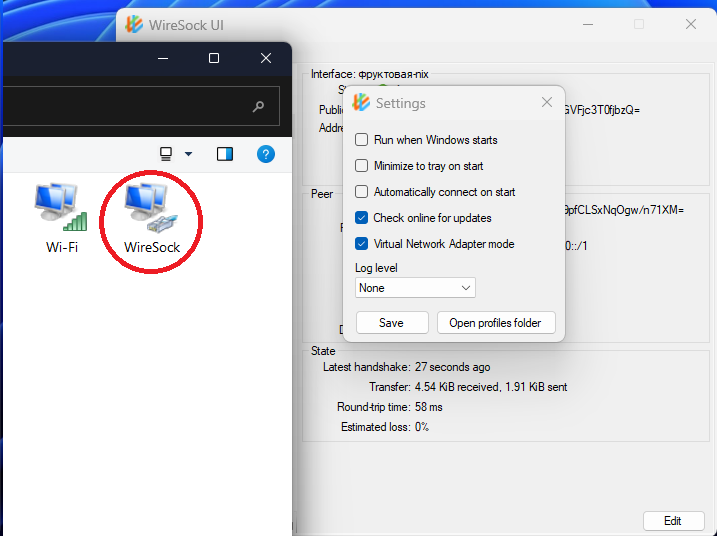 Keymaster
Да, это тот же драйвер под другим именем. Начинаю подозревать, что это какой-то нюанс связанный с подписью драйвера. Для текущих сборок используется Attested подпись и в принципе я пока не сталкивался, чтобы ее не хватало. Но похоже пора задуматься о whql подписи…
KeymasterА стандартная сборка Windows Packet Filter теперь тоже устанавливается или так же выдает ошибку? Его то мы вручную не ставили.
-
AuthorPosts