

Forum Replies Created
-
AuthorPosts
-
Vadim Smirnov
KeymasterHello,
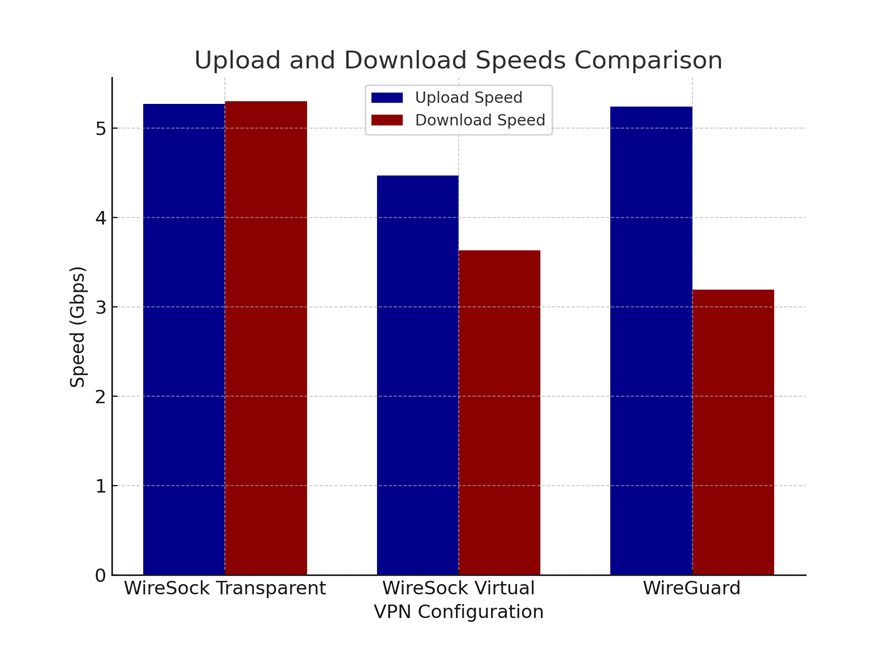
I will address both queries simultaneously. I can confirm that WinpkFilter is capable of handling 10Gbps networks. Unfortunately, I haven’t had the opportunity to test it on a 25Gbps network, so I am unable to provide any data for that. If you have a sufficiently fast CPU and do not require intensive CPU processing for the packets, you can manage packet reading and reinjection using a single thread (refer to the simple_packet_filter class for an example). Nonetheless, managing a 10Gbps bandwidth with complex packet processing can be challenging. For instance, in the transparent mode of Wiresock, I employed the queued_packet_filter, which utilizes four working threads per network interface: one for reading packets, another for processing, and two additional threads for reinjecting packets in each direction. While synchronization between 4 threads indeed has its costs, it’s important to note that the results have been remarkable, especially when compared to the official in-kernel implementation of WireguardNT.
 Keymaster
Could you clarify if this behavior is unique to Virtual Adapter mode, or does it impact Transparent mode as well? Since these modes are implemented in distinct manners, their behaviors might vary.
KeymasterIn the 1.2.39 build, I’ve adjusted our approach slightly. Instead of extracting the real source IP and port from the SOCKS header, which in your instance contained incorrect data, I’ve opted to directly assign the Wireguard server’s IP and port. This tweak seems to be more reliable, especially since SOCKS is only involved for the handshake process. This modification has been effective for both your setup and mine, so I’m considering it for inclusion in the mainline implementation.
Additionally, I’m curious about the need for handshake masquerading in the US. It’s clearly beneficial in countries like Egypt, Russia, and probably Iran too, as indicated by high traffic from this region. But in the US context, is this a necessary feature, or is it more about having the option to bypass potential Wireguard blocks?
KeymasterHere is another test build. Please give it a try.
1. For ARM64 systems: Download WireSock VPN Client ARM64 Version 1.2.39.1
2. For 64-bit systems: Download WireSock VPN Client x64 Version 1.2.39.1
3. For 32-bit systems: Download WireSock VPN Client x86 Version 1.2.39.1P.S. It seems that you’re experiencing a type of NAT collision when the SOCKS protocol is passing through the NAT. I’ll take some time to think this through.
KeymasterI’ve just realized that the IP addresses in the log entries are also inconsistent. The Wireguard server IP was wiped in the first log, and I initially missed it. Could you sketch out your network setup for me? Understanding your network configuration will help me figure out why the SOCKS proxy is behaving this way. Also, I’ll create a version of the build that doesn’t consider the source IP address and share it here for testing.
2024-03-03 07:02:56 [SOCKS5]: C2S_BEFORE: 192.168.1.156:63538 -> 100.222.101.186:13231
2024-03-03 07:02:56 [SOCKS5]: C2S_AFTER: 192.168.1.156:63538 -> 100.222.101.186:55564
2024-03-03 07:02:56 [SOCKS5]: S2C_BEFORE: 100.222.101.186:55564 -> 192.168.1.156:63538
2024-03-03 07:02:56 [SOCKS5]: S2C_AFTER: 100.2.3.111:63538 -> 192.168.1.156:63538KeymasterI’ve developed a test build that omits the source port consideration when the SOCKS5 feature is enabled. To evaluate this build, kindly download the appropriate version from the links below and test it:
1. For ARM64 systems: Download WireSock VPN Client ARM64 Version 1.2.38.1
2. For 64-bit systems: Download WireSock VPN Client x64 Version 1.2.38.1
3. For 32-bit systems: Download WireSock VPN Client x86 Version 1.2.38.1Your feedback after trying out this version would be greatly appreciated.
KeymasterSide note: If I configure proxy settings in any browser, I’m able to browse the internet without an issue.
When browsing the internet, most activities typically operate using the TCP protocol, making this point less relevant. Additionally, numerous UDP-based applications often overlook the source port value, thus remaining unaffected. However, an exception to this is WireSock, which verifies the source port to ensure it aligns with the Wireguard server endpoint. It’s also significant to note that UDP support was introduced exclusively in version 5 of the SOCKS protocol. Importantly, not all SOCKS5 proxies provide UDP support, and among those that do, the level of support can vary significantly.
KeymasterThank you for providing the log. It has greatly enhanced my understanding of the situation. Below is an example of how a log should appear when a handshake is conducted via a SOCKS5 proxy:
2024-03-03 09:44:29 [SOCKS5]: associate_to_socks5_proxy: USERNAME/PASSWORD authentication SUCCESS
2024-03-03 09:44:29 [SOCKS5]: associate_to_socks5_proxy: SOCKS5 ASSOCIATE SUCCESS port: 41205
2024-03-03 09:44:30 [SOCKS5]: C2S_BEFORE: 192.168.3.134 : 49666 -> 158.255.61.227 : 59876
2024-03-03 09:44:30 [SOCKS5]: C2S_AFTER: 192.168.3.134 : 49666 -> 158.101.212.135 : 41205
2024-03-03 09:44:30 [TUN]: Sent handshake packet to the WireGuard server at 158.255.51.217:59999
2024-03-03 09:44:30 [MGR]: Tunnel has started
2024-03-03 09:44:30 Wireguard tunnel has been started.
2024-03-03 09:44:30 [SOCKS5]: S2C_BEFORE: 158.101.212.135 : 41205 -> 192.168.3.134 : 49666
2024-03-03 09:44:30 [SOCKS5]: S2C_AFTER: 158.255.61.227 : 59876 -> 192.168.3.134 : 49666
2024-03-03 09:44:30 [TUN]: Handshake response received from 158.255.61.227 : 59876
Please focus on the last three lines. Here, it’s indicated that the UDP packet was received from the SOCKS5 proxy at [158.101.212.135 : 41205]. The genuine IP address and port of the Wireguard server, which are retrieved from the SOCKS5 header [158.255.61.227 : 59876], are then applied to the packet. This process results in a successful Wireguard handshake response, accurately incorporating the source IP address and port.
Now, examining the corresponding lines in your log:
2024-02-26 17:21:19 [SOCKS5]: C2S_BEFORE: 192.168.1.166 : 63811 -> x.x.x.x : 13231
2024-02-26 17:21:19 [SOCKS5]: C2S_AFTER: 192.168.1.166 : 63811 -> x.x.x.x : 53186
2024-02-26 17:21:19 [SOCKS5]: S2C_BEFORE: x.x.x.x : 53186 -> 192.168.1.166 : 63811
2024-02-26 17:21:19 [SOCKS5]: S2C_AFTER: 70.104.137.21 : 63811 -> 192.168.1.166 : 63811
Assuming 70.104.137.21 is your Wireguard server address, the last line should actually be:
2024-02-26 17:21:19 [SOCKS5]: S2C_AFTER: 70.104.137.21 : 13231 -> 192.168.1.166 : 63811It appears that the SOCKS5 header contains an incorrect source port. Consequently, the handshake response is not recognized, and the connection fails to establish. Technically, I could implement a workaround for this issue, but the behavior of your SOCKS5 proxy doesn’t seem right.
I suspect this might be a bug in the SOCKS5 proxy implementation. In my tests, I used Dante, which worked correctly. Do you know which SOCKS5 proxy implementation is being used in your case?
KeymasterI’ve recently added a Cygwin demonstration, providing Makefile for building the static version of the NDISAPI library as well as several basic examples. Hope it helps!
KeymasterI apologize for any earlier confusion. My advice is to start by building NDISAPI with Cygwin, which should streamline the process and address ABI compatibility issues. Although I haven’t personally built it using Cygwin, I consider it a viable option. The driver interface is well-documented, and the C++ code can be compiled using various Microsoft compilers, ranging from Visual C++ 6.0 to the latest Visual Studio 2022. Previously, I used C++ Builder for building it and it also worked just fine.
KeymasterRegrettably, I haven’t had enough spare time to dedicate to implementing this feature. Nonetheless, I’ll certainly consider adding support for local addresses in the future. Thank you for bringing it to my attention.
KeymasterIs there a document describing how to compile and run ndisapi or ndisapi based apps ( dnstrace etc. ) on Cygwin?
Unfortunately, no, and I haven’t attempted that myself. However, I believe it should be feasible to build NDISAPI with Cygwin or invoke the NDISAPI.DLL C interface from a Cygwin application. Thus, I’m somewhat puzzled by your error code. Kindly verify that you’ve compiled the code against the appropriate platform, ensuring, for instance, that you’re calling a 64-bit DLL from 64-bit code.
KeymasterThe log excerpt appears to be good. Could you supply some extra lines? It would also be helpful to review the generated pcap files.
KeymasterHave you clicked “Save” after modifying the settings? Alternatively, you can start the WireSock client from the command line; it will print the log directly to the console.
KeymasterCould you please try running WireSock with logging enabled and share the log? It may provide insights into what went wrong.
-
AuthorPosts