

Forum Replies Created
-
AuthorPosts
-
February 5, 2019 at 7:08 pm in reply to: VirtNet does not install on Windows 10 version 1809 x64 #10638
You have not paid enough attention to my previous post mentioning locally administered MAC address requirement. You can read a little more on this here. In you case addr[0] = 0x74 and it does not meet the condition to be locally administered MAC address. You can use 0x72, 0x76, 0x7A or 0x7E instead.
February 5, 2019 at 12:38 pm in reply to: VirtNet does not install on Windows 10 version 1809 x64 #10633OK, I have added NetworkAddress property. You can download the updated driver using the same link
Though please note that in this build assigning the network adapter hardware address has a few limitations:
1) It should not be multicast address (addr[0] & 0x01 == 0)
2) It should not be broadcast address (FF-FF-FF-FF-FF-FF)
3) It should be marked as assigned by the local administrator (addr[0] & 0x2 == 1)Example of valid address is 06-01-02-03-04-05
February 4, 2019 at 10:23 pm in reply to: VirtNet does not install on Windows 10 version 1809 x64 #10630I’ve created a quick NDIS 6.0 replacement for the original VirtNet driver. You can download it from here. Let me know how it worked for you…
February 4, 2019 at 9:15 pm in reply to: VirtNet does not install on Windows 10 version 1809 x64 #10629I have devoted some time over the weekend to this issue, but I still don’t have a good idea what was changed by an update and how to fix this. It is definitely not about driver signing because that phase is passed fine. And setupapi.dev.log does not contain any helpful information:
>>>  [Device Install (DiInstallDevice) - ROOT\NET\0000]
>>>  Section start 2019/02/04 11:53:39.838
      cmd: "C:\Windows\system32\mmc.exe" C:\Windows\system32\devmgmt.msc
     ndv: Flags: 0x00000004
     dvi: {Plug and Play Service: Device Install for ROOT\NET\0000}
!    dvi:      Installing NULL driver!
     dvi:      {DIF_ALLOW_INSTALL} 11:53:39.858
     dvi:           Default installer: Enter 11:53:39.858
     dvi:           Default installer: Exit
     dvi:      {DIF_ALLOW_INSTALL - exit(0xe000020e)} 11:53:39.862
     dvi:      {DIF_REGISTER_COINSTALLERS} 11:53:39.862
     dvi:           Default installer: Enter 11:53:39.862
     dvi:           Default installer: Exit
     dvi:      {DIF_REGISTER_COINSTALLERS - exit(0x00000000)} 11:53:39.866
     dvi:      {DIF_INSTALLDEVICE} 11:53:39.866
     dvi:           Default installer: Enter 11:53:39.866
!    dvi:                Installing NULL driver!
     dvi:                Install Null Driver: Removing device sub-tree. 11:53:39.870
     dvi:                Install Null Driver: Removing device sub-tree completed. 11:53:39.874
     dvi:                Install Null Driver: Restarting device. 11:53:39.878
     dvi:                Install Null Driver: Restarting device completed. 11:53:39.882
     dvi:                Install Device: Configuring device class. 11:53:39.882
     dvi:                Install Device: Configuring device class completed. 11:53:39.882
     dvi:                Device Status: 0x01802401, Problem: 0x1c (0x00000000)
     dvi:                Install Device: Starting device 'ROOT\NET\0000'. 11:53:39.886
     dvi:                Install Device: Starting device completed. 11:53:39.894
     dvi:           Default installer: Exit
     dvi:      {DIF_INSTALLDEVICE - exit(0x00000000)} 11:53:39.898
     ump: {Plug and Play Service: Device Install exit(00000000)}
<<<  Section end 2019/02/04 11:53:39.910
<<<  [Exit status: SUCCESS]

>>>  [Delete Device - ROOT\NET\0000]
>>>  Section start 2019/02/04 11:59:51.125
      cmd: "C:\Windows\system32\mmc.exe" C:\Windows\system32\devmgmt.msc
     dvi: Query-and-Remove succeeded
<<<  Section end 2019/02/04 11:59:51.133
<<<  [Exit status: SUCCESS]
Mentioned Problem: 0x1c is CM_PROB_FAILED_INSTALL for which I could find anything helpful besides https://docs.microsoft.com/en-us/windows-hardware/drivers/install/cm-prob-failed-install
The only solution I can see so far would be creating a new NDIS 6 virtual network adapter driver…
January 31, 2019 at 1:34 pm in reply to: VirtNet does not install on Windows 10 version 1809 x64 #10622Small update:
Signing VirtNet driver with EV certificate did not help, installation fails with the same error. So it looks that the problem is not related to driver signing and there is another reason for this. Right now it is difficult to say what has changed in 1809, may be Microsoft by chance or by purpose has dropped the support of the legacy versions of NDIS. I hope NDIS 6.0 version of VirtNet may help here…
January 27, 2019 at 10:10 pm in reply to: VirtNet does not install on Windows 10 version 1809 x64 #10619I’ve installed and tested 1809 during the weekend and I confirm that the problem exists. Probably it is related to driver signing policy changes or another possibility is legacy NDIS versions support (for compatibility across all Windows versions VirtNet followed NDIS 3.0 specification). But no worries, I’ll prepare the new build when have some spare time over the next week.
January 20, 2019 at 9:12 am in reply to: VirtNet does not install on Windows 10 version 1809 x64 #10617Thank you for the information. I suspect this is related to the driver signing policy in 1809 update. I will check, probably needed to sign the driver with EV certificate.
It is possible for two applications to use the driver if they filter over different network adapters. Otherwise they may conflict.
However, please note that file handle is normally valid inside the process and can’t be passed outside as it is, unless it is inherited by child process or duplicated (DuplicateHandle). Besides this, please note that handle returned by OpenFilterDriver is a pointer to in-process memory object and can’t be passed by inheritance or duplication.
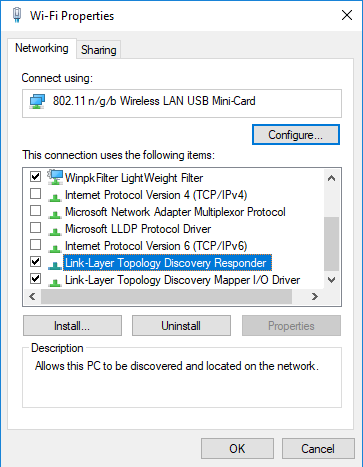
I had some time over the weekend to play with with bridging WiFi and one of the possibilities is enabling Link Layer Discovery Protocol, with the configuration below Wi-Fi adapter without IP address was successfully bridged to the wired network:
Very interesting, thank you for sharing!
Hmm, interesting case. I don’t have a quick answer because I have never tried this kind of setup. If I have some spare time over the weekend I will give it a try.
For the sample code you can check the Ethernet Bridge source where promiscuous mode is used:
Check the line 208 in https://github.com/wiresock/ndisapi/blob/master/examples/ethernet_bridge/EthernetBridge.cpp
I have had one recent similar report regarding Windows 10 Enterprise. And it may happen that Microsoft has reinforced driver signing requirements for the Enterprise editions of Windows (code signing certificate expiry is validated against the install date instead signing date). Will check when have some spare time.
The driver is production signed, so you should not have digital signature problems with installing it. Do you use the driver build from amd64 folder?
What is the version of Windows you use?
-
AuthorPosts
