

Forum Replies Created
-
AuthorPosts
-
December 22, 2021 at 11:05 am in reply to: Can I select the default interface when using WireSock VPN client on win10 #12003
Vadim Smirnov
KeymasterI’ve looked through the capture logs. The problem is not in keepalive packet. After some timeout, connection to SOCKS proxy is broken (probably ISP NAT removes by timeout) and handshakes can’t reach the destination.
The build below attempts to refresh SOCKS proxy connection after fist non-responded handshake.
December 22, 2021 at 10:10 am in reply to: Can I select the default interface when using WireSock VPN client on win10 #12001KeymasterYes, Keepalive packets were sent through the SOCKS proxy, and it caused some problems. Please test the build below:
https://1drv.ms/u/s!AqMWR3uDO7eagdployq7zTR7TJOIdA?e=tUgS7D
Normally, Handshakes are sent every two minutes, while Keepalive packets are sent if no other packets were sent after PersistentKeepalive interval.
December 22, 2021 at 12:40 am in reply to: Can I select the default interface when using WireSock VPN client on win10 #11997KeymasterRegretfully, #11993 has the same problem with the first handshake. Please test the one below, I hope I have fixed all places where it could come from:
December 21, 2021 at 10:43 pm in reply to: Can I select the default interface when using WireSock VPN client on win10 #11993KeymasterHere is the build which sends only handshake over SOCKS5 but does not allow handshake to go out until SOCKS session is not ready.
December 21, 2021 at 10:32 pm in reply to: Can I select the default interface when using WireSock VPN client on win10 #11992KeymasterHowever, may be the problem in the first handshake which I have passed over before the SOCKS connection was ready:
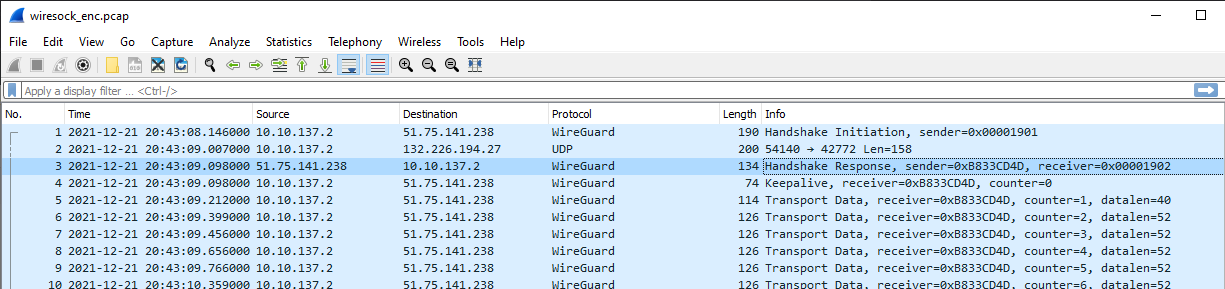
It could result in DPI logging the WireGuard connection attempt and subsequent blocking of incoming packets. I will make another build to fix this.
December 21, 2021 at 10:06 pm in reply to: Can I select the default interface when using WireSock VPN client on win10 #11988KeymasterPlease try this build
https://1drv.ms/u/s!AqMWR3uDO7eagdphxyLoAnh77tB0UQ?e=H3q4Xf
Please note to reduce WireGuard MTU by 10 bytes. It can be a little noisy on
-log-level allproducing numerous messages from SOCKS:2021-12-21 21:58:39 [SOCKS5]: C2S_BEFORE: 192.168.1.26 : 58615 -> 152.70.176.114 : 59075 2021-12-21 21:58:39 [SOCKS5]: C2S_AFTER: 192.168.1.26 : 58615 -> 132.226.194.27 : 43603 2021-12-21 21:58:39 [SOCKS5]: C2S_BEFORE: 192.168.1.26 : 58615 -> 152.70.176.114 : 59075 2021-12-21 21:58:39 [SOCKS5]: C2S_AFTER: 192.168.1.26 : 58615 -> 132.226.194.27 : 43603 2021-12-21 21:58:39 [SOCKS5]: C2S_BEFORE: 192.168.1.26 : 58615 -> 152.70.176.114 : 59075 2021-12-21 21:58:39 [SOCKS5]: C2S_AFTER: 192.168.1.26 : 58615 -> 132.226.194.27 : 43603 2021-12-21 21:58:39 [SOCKS5]: C2S_BEFORE: 192.168.1.26 : 58615 -> 152.70.176.114 : 59075 2021-12-21 21:58:39 [SOCKS5]: C2S_AFTER: 192.168.1.26 : 58615 -> 132.226.194.27 : 43603 2021-12-21 21:58:39 [SOCKS5]: C2S_BEFORE: 192.168.1.26 : 58615 -> 152.70.176.114 : 59075 2021-12-21 21:58:39 [SOCKS5]: C2S_AFTER: 192.168.1.26 : 58615 -> 132.226.194.27 : 43603 2021-12-21 21:58:39 [SOCKS5]: S2C_BEFORE: 132.226.194.27 : 43603 -> 192.168.1.26 : 58615 2021-12-21 21:58:39 [SOCKS5]: S2C_AFTER: 152.70.176.114 : 59075 -> 192.168.1.26 : 58615December 21, 2021 at 9:33 pm in reply to: Can I select the default interface when using WireSock VPN client on win10 #11986KeymasterYes, there is a problem, but it is not about the DNS…
Handshake works fine over the UDP proxy and packets are sent out over the tunnel. However, only very few packets come back from WireGuard server. I can see only the following incoming packets:
counter(258):session(1902), counter(199-204):session(1904), counter(250):session(1905). According to the counters, WireGuard server is sending packets to you, but most of them are dropped on the way. I wonder why refreshing the network connection resolves the issue, but it looks that not only handshake can be blocked…We could try to pass all WireGuard traffic over the UDP proxy to see if it improves the behavior.
December 21, 2021 at 8:13 pm in reply to: Can I select the default interface when using WireSock VPN client on win10 #11984KeymasterCould you collect PCAP files with disabled adguard and non-working DNS? I will check what can be wrong with DNS queries.
December 21, 2021 at 7:31 pm in reply to: Can I select the default interface when using WireSock VPN client on win10 #11982KeymasterHmm, could you try to disable Adguard and check if the problem with DNS persists?
December 21, 2021 at 10:50 am in reply to: Can I select the default interface when using WireSock VPN client on win10 #11977KeymasterI’ve looked through the captures, and basically, it looks ok. Although, there are some TCP sessions which were already active at the moment you activated Wiresock VPN client and packets from these sessions can be still received from outside the tunnel. At the same time, outgoing packets are forwarded over the tunnel and such sessions naturally die after retransmit attempts. So, the general recommendation is restarting the browser after activating the tunnel to avoid these session artifacts.
Besides this, the approach with forwarding Wireguard handshake through the SOCKS5 proxy seems working as expected. Have you tried to test Wiresock VPN client with Wireguard service other than warp+?
December 20, 2021 at 11:23 pm in reply to: Can I select the default interface when using WireSock VPN client on win10 #11974KeymasterWhen started with
-log-level allwiresock stores the traffic into pcap files which can be analyzed in Wireshark. If you are interested I could take a look at these captures to understand what is wrong with them.P.S. Also it might be reasonable to test the fresh Windows setup.
December 20, 2021 at 10:07 pm in reply to: Can I select the default interface when using WireSock VPN client on win10 #11972KeymasterThis is confusing, I have tested these URLs with my configuration posted above, which actually less restrictive than yours and tunnels only Google Chrome and only for non-local addresses. And all the web-sites from your list report the VPN address.
Anyway, IP leak should have an explanation. What browser have you been using? I would also try to test on the system without any other low-level networking software installed for the cleanliness. May be one of these VPNs/tunnels you have tested with causes the leak. Besides this, I could create the configuration on my VPN server to test for the case if the problem in VPN server.
December 20, 2021 at 8:53 pm in reply to: Can I select the default interface when using WireSock VPN client on win10 #11970KeymasterSo, it probably was incorrect configuration of your SOCKS proxy.
What is your configuration and what sites have you tested with? Something like https://www.speedtest.net and https://www.whatismyip.com?
December 20, 2021 at 8:28 pm in reply to: Can I select the default interface when using WireSock VPN client on win10 #11968KeymasterI have added 197.36.2.166 to the allow list. You can try
Socks5Proxy = 132.226.194.27:1080KeymasterГм, видимо до сих пор никому не понадобилось. Добавлю, это в общем несложно.
-
AuthorPosts