
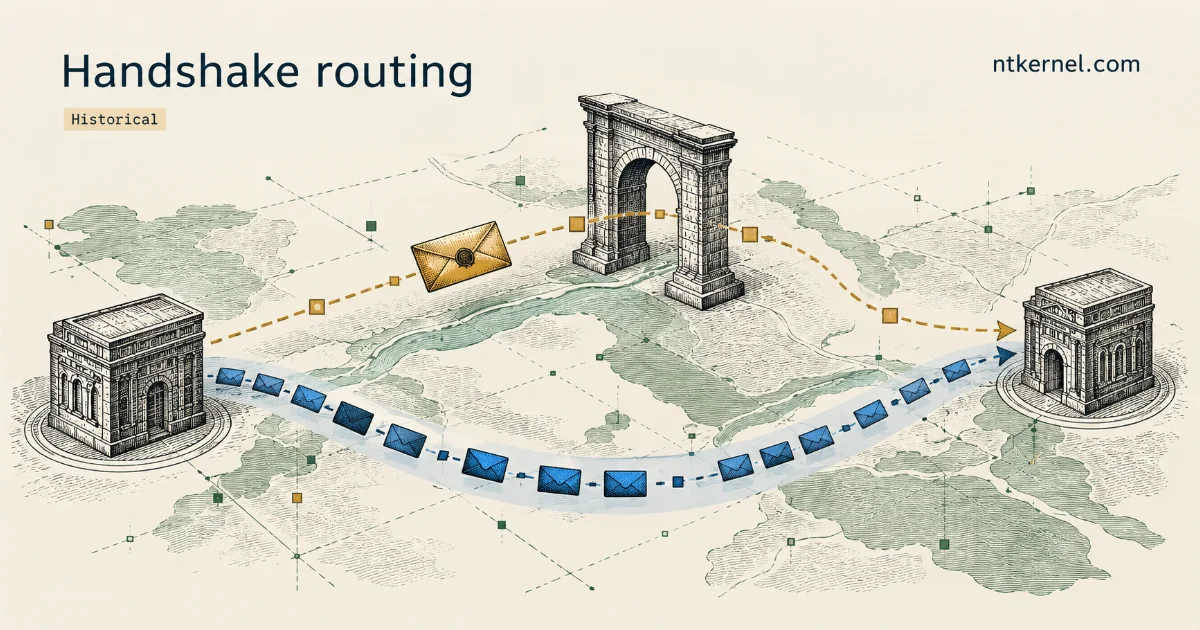
A simple WireGuard block can focus on recognizing the handshake and dropping those packets. Such a rule may be enough to prevent a connection, yet leave room for a small workaround. Over time, filtering can become more sophisticated and make that workaround ineffective. The experiments described here and in the follow-up illustrate how this progression can unfold.
In the experiment I wrote about in February 2022, a user in Egypt could start a WireGuard tunnel through another VPN, then turn off that other VPN and keep using WireGuard. That report led me to try a smaller intervention in WireSock: send the handshake through a SOCKS5 proxy while letting the encrypted tunnel traffic travel directly to the WireGuard server.
Handshake-only proxying worked in the reported tests, but later stopped being sufficient. The May 2024 follow-up describes sending all WireGuard traffic through the proxy. This sequence suggests that the filtering became more demanding, although the tests did not reveal exactly how it was implemented.
What the Handshake Reveals
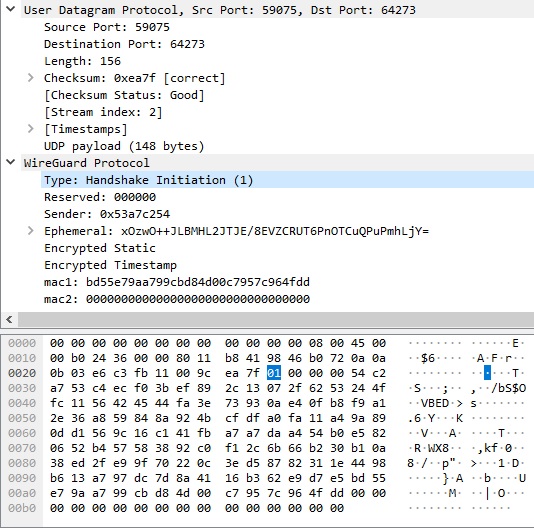
WireGuard encrypts the traffic inside a tunnel, but its outer packet format is recognizable. In the standard protocol, a Handshake Initiation has a 148-byte UDP payload starting with 01 00 00 00. These bytes come after the UDP header; 148 is not the length of the whole IP packet.
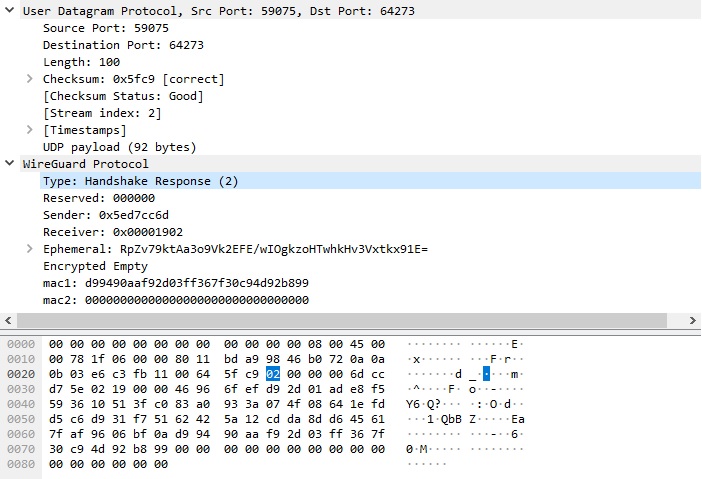
The responder replies with a 92-byte UDP payload starting with 02 00 00 00. In both messages, the first byte identifies the message type and the next three bytes are reserved and set to zero. These properties can help identify a flow, but matching a size and a few bytes alone does not prove that the traffic is WireGuard.
After receiving the Handshake Response, the initiator sends a transport data message to confirm the new session keys. If no data is queued, it sends an empty authenticated keepalive: a 16-byte WireGuard transport header plus a 16-byte authentication tag, for a 32-byte UDP payload. Active sessions normally rekey after approximately two minutes.
That does not mean a tunnel always sends exactly two handshake packets every two minutes. Loss can trigger retries, a busy responder can request a cookie, and rekeying depends on session activity and timers. The WireGuard implementation defines the message sizes separately from its transport and timer behavior.
A Clue from the Forum
The forum discussion started with a practical workaround. A user established a WireGuard tunnel with a Cloudflare WARP+ configuration while connected through Windscribe, then disconnected Windscribe. WireGuard continued carrying traffic without that outer VPN.
One possible explanation was that filtering depended on how a UDP flow began. If a filter recognized the initial handshake, it might block the flow; if the flow first appeared as encrypted transport traffic, it might allow it. During testing, a handshake sent directly instead of through the proxy was followed by continued blocking of that flow. Starting through the proxy produced a different result.
That was a useful working hypothesis, not a description of a confirmed nationwide filtering algorithm. The observations did not establish which equipment made the decision, how long it remembered a flow, or whether every Egyptian provider behaved the same way.
Routing the Handshake Through SOCKS5
I had already been working on a BoringTun-based Windows client. Adding SOCKS5 support gave us a way to change the handshake path without needing another full VPN connection just to get started.
In handshake-only mode, WireSock sends the handshake through the proxy, which forwards it to the WireGuard server and relays the response. Transport messages then travel directly between the client and the WireGuard server. This keeps bulk tunnel traffic off the proxy, but it also leaves that direct traffic available for filtering. Successful key exchange is only the first part of a working connection.
The proxy must support UDP ASSOCIATE. A SOCKS server that can only relay TCP connections is not enough. As RFC 1928 specifies, the client opens a TCP control connection and receives the address and port of a UDP relay. The UDP association ends when that TCP connection closes. Firewalls must allow access to the returned relay endpoint, which need not use the proxy’s TCP listening port.
These details mattered during the experiment. The later forum tests included idle-time failures and changes to reconnect the proxy connection. A tunnel working immediately after startup was not enough; it also had to survive rekeying and resume after an idle period. For a server setup, see Dante in Oracle Cloud.
Configuring WireSock
For a current WireSock profile, add these options inside the existing [Peer] section. Keep the peer’s Endpoint pointed at the WireGuard server. Replace the placeholders with your own SOCKS5 server and its credentials; this fragment is not a complete VPN configuration.
# Existing [Peer] section:
#@ws:Socks5Proxy = proxy.example.com:1080
#@ws:Socks5ProxyUsername = YOUR_PROXY_USERNAME
#@ws:Socks5ProxyPassword = YOUR_PROXY_PASSWORD
The username and password options are optional if the server does not require them. The #@ws: prefix is understood by WireSock, while ordinary WireGuard clients treat these lines as comments. It does not add proxy support to those clients. The WireSock parameter reference describes these extensions.
The configuration above uses the handshake-only approach. With current WireSock, adding #@ws:Socks5ProxyAllTraffic = true sends transport traffic through the proxy as well. Check the selected mode in your profile, especially if it already contains that option. All-traffic mode needs more relay bandwidth and adds a SOCKS5 UDP header to each relayed datagram, so its path and MTU need to be considered separately.
Plain SOCKS5 adds no encryption layer. WireGuard still protects the tunnel payload, but the proxy framing and WireGuard message patterns can remain identifiable. SOCKS5 username/password authentication also sends credentials in cleartext, as specified in RFC 1929; those credentials are outside the WireGuard tunnel encryption. Use a dedicated proxy password, not a password reused for another account.
What the Experiment Showed
In the original tests, both handshake-only relay and relaying all WireGuard traffic allowed the tunnel to work. We chose handshake-only relay because it avoided sending bulk traffic through the proxy. That choice reduced the proxy’s role; it was not a guarantee of higher throughput on every route.
There was also a separate nested-tunnel observation: wrapping the inner WireSock handshake in SOCKS5 restored connectivity in a setup using the official WireGuard for Windows client as the outer tunnel. The affected builds were reported as being in the 0.5 to 0.5.3 range. This does not establish why those builds behaved that way or how current versions behave.
A similar handshake-routing helper for the official client was an idea I considered using Windows Packet Filter. The working implementation discussed here was in WireSock; this article does not provide a separate helper for the official client.