
WireGuard quickly became a popular VPN protocol: simple, fast, cleanly designed, and free of heavy legacy baggage. It stood out against monsters like IPsec and OpenVPN. But, as often happens, its strength eventually became a weakness. The protocol turned out to be not only convenient and predictable, but also easy to recognize, which makes it relatively easy to block.
As soon as attempts to block WireGuard appeared, the first attempts to hide it appeared as well. At first, these were fairly simple tricks: for example, sending several junk UDP packets before the handshake to confuse DPI at the beginning of a session. Then AmneziaWG appeared and went further, changing the external appearance of WireGuard packets themselves: headers, sizes, and additional junk data inside the handshake.
AmneziaWG 2.0 created even more room to maneuver: S3–S4 were added to the already existing S1–S2, and controlled inserts could now be applied not only to the handshake, but also to other message types, including the main data stream. At the same time, the idea of imitation packets kept evolving: before the handshake, it became possible to send not just random junk, but packets that looked like traffic from another protocol, in order to disrupt initial classification.
This article is about the next step in the development of that idea. Previously, imitation packets mostly worked as a short smoke screen before the handshake. Now imitation moves into the stream itself: AmneziaWG transport packets on the wire begin to look like QUIC, DNS, STUN, or SIP.
When Simplicity Becomes a Liability
When people say that DPI recognizes WireGuard, it is easy to imagine something almost magical: a smart box somewhere at the ISP opens packets, analyzes their contents, builds complex models, and only then makes a decision. In practice, things are often much simpler.
WireGuard has fixed message types, predictable sizes for the initial packets, and a characteristic exchange order at the start of a session: Handshake Initiation, then Handshake Response, then transport data. All of this runs over UDP, and the first packets of a connection look recognizable enough.
For DPI, this is a convenient situation. It is enough to look at external signals: packet sizes, order, the first bytes, and the behavior of the UDP session. If they add up to a familiar pattern, the flow can be marked as WireGuard. After that, anything can be done with it: block it, slow it down, tear it down after the handshake, or simply place it into a separate category for further analysis.
In this sense, WireGuard presents itself too “honestly.” It is neat, minimalistic, and predictable. For a protocol, this is an advantage. But in networks with aggressive filtering, such predictability turns into a serious drawback.
Can’t See the Forest for the Trees
The first idea was simple: if DPI catches WireGuard by the characteristic beginning of a session, then that beginning needs to stop being so obvious.
Before the real handshake, the client sends several UDP packets with random data. They carry no meaningful payload and simply create background noise. As a result, Handshake Initiation no longer appears as the first packet in an empty flow; it gets lost among other datagrams.
This is certainly not serious steganographic protection. But the idea itself is important: the client no longer merely hopes that DPI will not recognize it; it starts shaping the picture that the observer will see.
Against simple filters, this approach can really work, especially if blocking is tied to the first packets of a UDP session. If the filter sees Handshake Initiation in a clean flow, it marks the flow as WireGuard and blocks it. If it does not see it, the connection has a chance to go further.
But random noise has an obvious limit. If a set of packets with random contents suddenly appears before a VPN session, that also becomes a signal. Yes, this is no longer plain WireGuard. But it is not a normal application protocol either. Ordinary protocols rarely begin a conversation with a meaningless set of bytes without any structure.
Noise can confuse a simple classifier, but by itself it does not make traffic look like something allowed. It says, in effect: “I am not WireGuard; I am just something strange.” And in networks with strict filtering, “something strange” is not the best mask either.
AmneziaWG: Erasing WireGuard’s Fingerprints
The next noticeable step was AmneziaWG. If the first masking attempts hid WireGuard behind noise before the session, AmneziaWG went deeper and began changing the appearance of the packets themselves.
The idea is simple: if DPI recognizes a protocol by characteristic features, those features need to be made less stable. That is why AmneziaWG can add junk packets before the handshake, change message type header values, and add extra data inside the handshake so that it no longer stands out by its familiar size.
As a result, it is no longer only the beginning of the session that gets masked, but also the packets by which WireGuard used to be easy to identify. DPI no longer sees the canonical handshake: sizes change, packet types look different, and signatures become blurred.
In practice, self-hosted AmneziaWG often turns out to be noticeably more resilient than ordinary WireGuard. And yet it is still a game of hiding: making WireGuard less similar to itself.
AmneziaWG 2.0: More Room to Maneuver
In AmneziaWG 2.0, the masking idea gained more space. Previously, the main inserts were related to the handshake. Now controlled padding has appeared for other message types as well.
From a practical point of view, these are four fields: S1–S4. Each one corresponds to its own WireGuard packet type:
S1for Handshake Initiation;S2for Handshake Response;S3for Cookie Reply;S4for Transport Data.
Alongside them are H1–H4. These are the values with which AmneziaWG replaces the standard WireGuard message type header. In the second version, they can be specified not only as concrete numbers, but also as ranges. As a result, the packet becomes less stable externally: a controlled insert appears before it, and the familiar WireGuard header is no longer so obvious.
In my opinion, however, the most interesting extension in AmneziaWG 2.0 is S4, which applies to Transport Data, that is, to the main data stream. This means that masking space appears not only at the start of the connection, but throughout the entire lifetime of the tunnel.
And here a natural question arises: if every packet already has space for a controlled insert, does it have to be filled with random bytes? Why not use that space so that the packet starts looking not like random noise, but like another protocol?
From Randomness to Imitation
So, the idea is to replace random noise in S1–S4 with a meaningful structure that resembles traffic from another protocol. Combined with properly generated imitation and junk packets, this helps form a more plausible external profile of the connection.
Obviously, full bidirectional imitation requires both sides of the VPN tunnel. On the server side, this is handled by amneziawg-proxy: a separate UDP proxy placed in front of the AmneziaWG server. AmneziaWG itself is moved to loopback, for example to 127.0.0.1, while the public UDP port is occupied by the proxy. This is the port DPI sees from the outside, and this is the port external checks interact with.
The server proxy has two tasks. First, it responds to active probes like a real service. If a QUIC Initial, DNS query, STUN Binding Request, or SIP request arrives at the port, the proxy returns the expected response for the corresponding protocol: Version Negotiation for QUIC, a DNS response for DNS, Binding Success for STUN, and 100 Trying for SIP.
This matters because passive masking is no longer enough. A filter can not only look at traffic passing through, but also check a suspicious port itself: is QUIC, DNS, STUN, or SIP really running there? If the port is silent or responds differently from how a real service should respond, the mask quickly falls apart.
Second, the proxy works with the server-side direction of traffic. AmneziaWG packets already contain controlled S-inserts, and the proxy can overwrite that space not with random bytes, but with bytes characteristic of the selected protocol. As a result, response packets from the server side begin to look like QUIC, DNS, STUN, or SIP, even though the encrypted AmneziaWG payload remains inside.
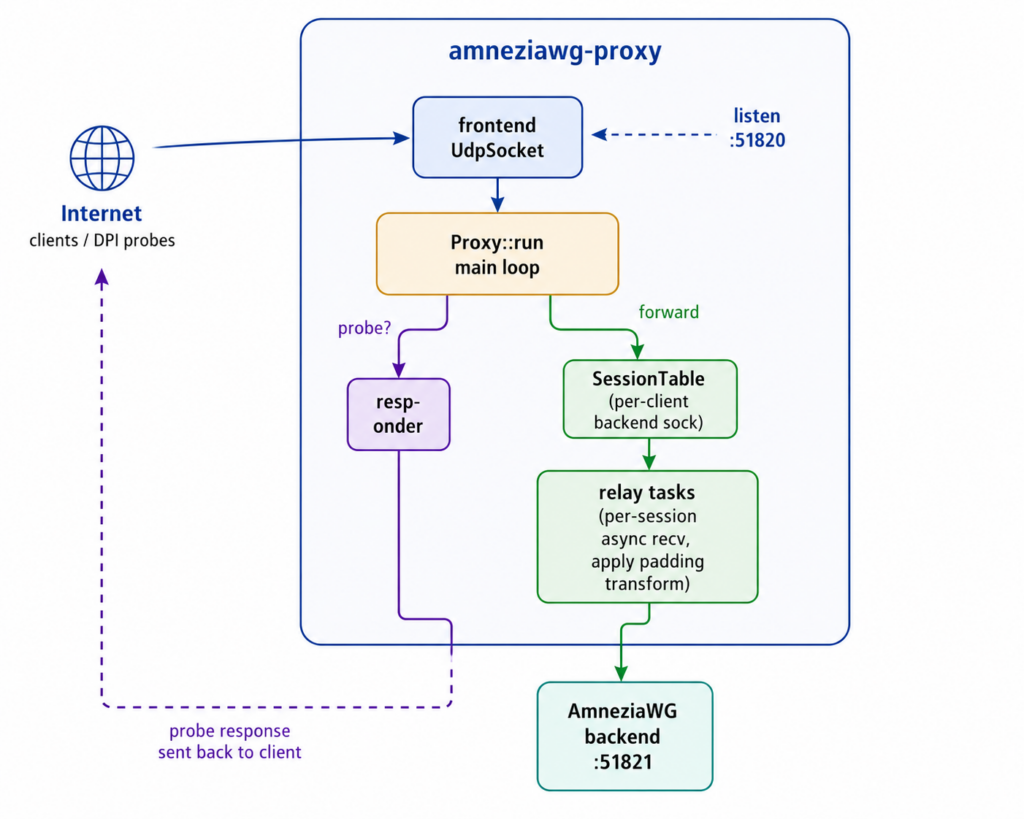
But that is only half of the picture. For imitation to be bidirectional, the client also needs to be able to shape packets in the same style. This part is implemented by WireSock Secure Connect 3.5+. It creates client-side imitation packets and fills S-inserts on its side so that the client-to-server direction looks not like ordinary AmneziaWG, but like traffic from the selected protocol.
It is precisely the combination of WireSock Secure Connect 3.5+ and amneziawg-proxy that makes the approach complete. The proxy is responsible for the server side, probe responses, and masking the response stream. WireSock Secure Connect takes care of the client side. Together, they change the appearance of datagrams on the wire so that, to an outside observer, this is not WireGuard and not “obfuscated WireGuard,” but traffic of the selected protocol: QUIC, DNS, STUN, or SIP.
This approach develops the idea of imitation packets I1–I4 and moves it to the next level. In my opinion, those parameters themselves are not the most convenient for users, so in WireSock Secure Connect I replaced them with a more understandable scheme: domain, protocol, and browser profile. But the idea is effective: instead of showing DPI random noise before the handshake, show it traffic that looks like another protocol.
And if the server also responds to those packets like a real service, while the subsequent stream continues to look like the selected protocol, the mask becomes much more convincing.
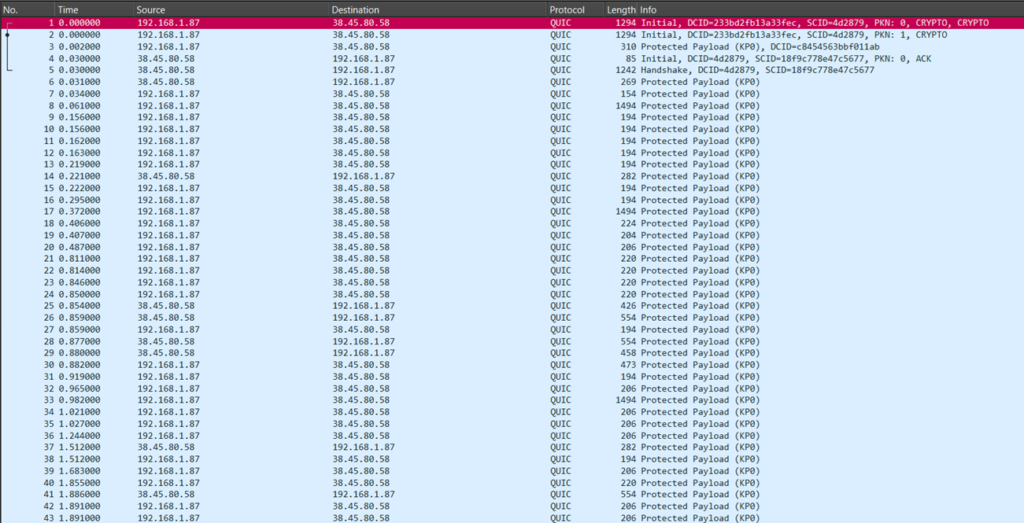
QUIC mode on the server’s public port. Wireshark parses the flow as ordinary QUIC: Initial with CRYPTO, then Handshake and Protected Payload. Inside, however, the AmneziaWG tunnel remains, while the external packet form is defined by amneziawg-proxy and WireSock Secure Connect.
Why Imitation Is Better Than Noise
Random padding helps hide recognizable features, but it does not make traffic look like a normal protocol. It creates uncertainty instead: this is no longer clean WireGuard, but it is not something familiar to the network either.
Protocol imitation works differently. Its goal is not just to remove the WireGuard signature, but to put a more plausible picture in its place: to make the packet look not like a set of random bytes, but like QUIC, DNS, STUN, SIP, or something else.
For DPI, this is a different situation. The packet does not merely stop looking like WireGuard; it begins to look like a normal packet of the selected protocol. At the beginning of the datagram, a meaningful QUIC, DNS, STUN, or SIP structure appears instead of random bytes that simply mask the WireGuard header.
Of course, this does not make traffic invisible. But it changes the cost of analysis. It is one thing to block everything that looks like WireGuard or strange UDP noise. It is another thing to start aggressively suspecting traffic that looks like QUIC, DNS, STUN, or SIP, while not affecting real services that use the same protocols.
In networks where false positives are undesirable, this becomes a very different game.
Imitation Modes
At the moment, amneziawg-proxy supports several imitation modes: QUIC, DNS, STUN, SIP, and auto. In auto mode, the imitation protocol is selected separately for each client based on the first packet that arrives from that client at the public port.
QUIC looks like the most natural default choice. The modern internet is already full of QUIC/HTTP3 traffic: it runs over UDP, is encrypted, has high entropy, and usually does not look like a good old text protocol. If you need to choose a “default” mask, QUIC looks logical.
Another interesting option is DNS. On the one hand, DNS is often allowed even in fairly strict networks. On the other hand, DNS traffic is usually expected on port 53, and its behavior may be closely monitored. That is why it is especially important here that the packet not look like WireGuard with a random insert at the beginning, but parse normally as a DNS message.
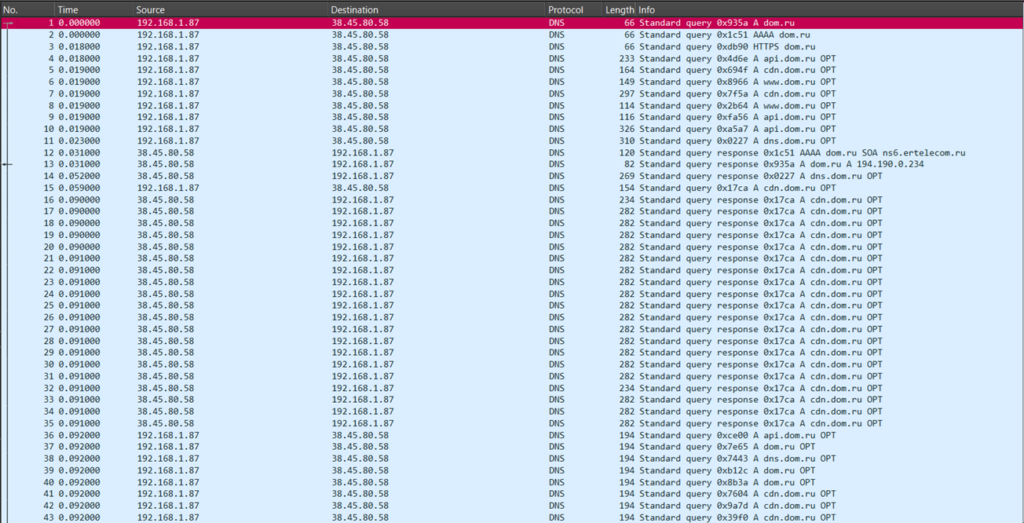
DNS mode. The capture shows ordinary DNS queries and responses: A/AAAA/HTTPS records, subdomains, and OPT records. With DNS forwarding enabled, DNS probes can receive real responses from an upstream resolver, so the port looks not merely like a stub, but like a working DNS service.
STUN is useful where WebRTC or other NAT traversal traffic is expected in the network. In this mode, packets look like ordinary Binding Request / Binding Success Response messages. This is not the most universal camouflage, but in the right environment it fits well into the expected picture.
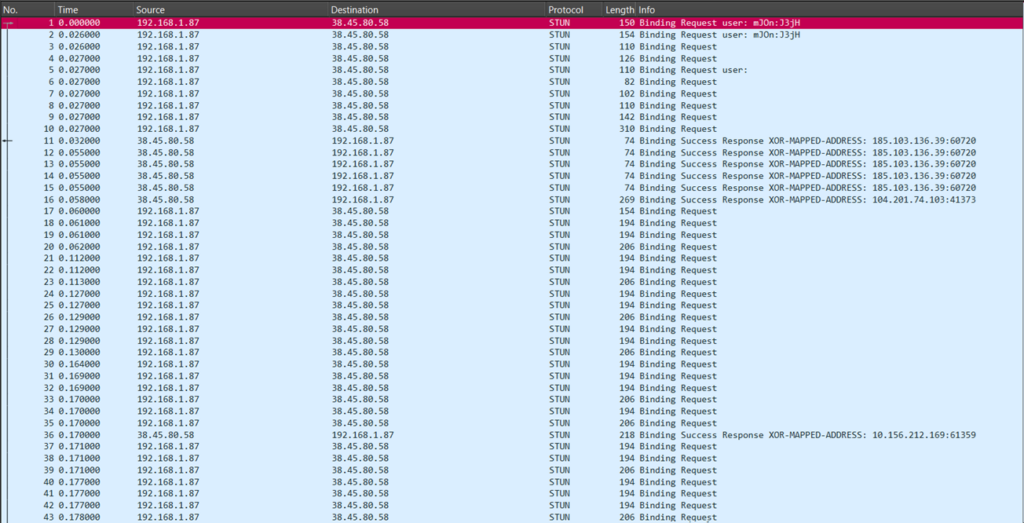
STUN mode. Client packets look like Binding Request messages, while server packets look like Binding Success Response messages with XOR-MAPPED-ADDRESS. To an observer, this resembles an ordinary NAT traversal / WebRTC-like exchange.
SIP looks like the most unusual mode. At first glance, the idea of masking a VPN as VoIP signaling may seem strange. In practice, however, the picture turns out to be quite convincing: textual SIP headers, INVITE, OPTIONS, REGISTER, and SUBSCRIBE requests, and familiar responses such as 100 Trying or 200 OK. This mode clearly shows how far we have moved away from simple random padding: the traffic no longer merely hides; it tries to play the role of a very specific service.
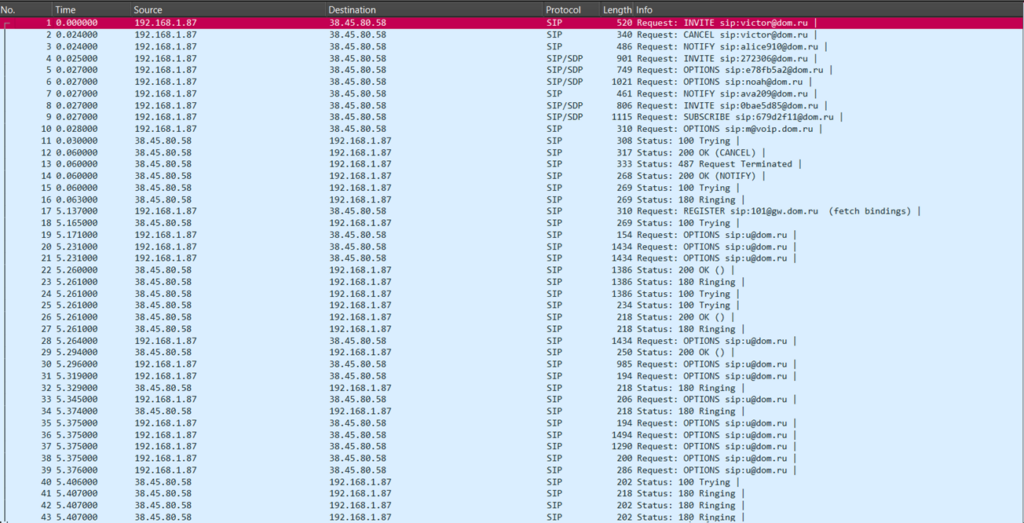
SIP mode. The capture shows INVITE, CANCEL, NOTIFY, OPTIONS, REGISTER, and SUBSCRIBE messages, along with responses such as 100 Trying, 180 Ringing, and 200 OK. On the wire, such a flow looks like signaling for VoIP infrastructure.
The auto mode is intended for a scenario where the same server accepts clients using different imitation modes. In this mode, the proxy does not fix one protocol in advance, but looks at the first packet from each client. If the packet resembles QUIC, DNS, STUN, or SIP, the proxy remembers that protocol for the given session and uses it for response traffic from then on.
If the first packet does not look like any known mode, the session remains in the none state and works as ordinary AmneziaWG forwarding without protocol imitation on the proxy side.
Why WireSock Secure Connect 3.5+ Is Needed Here
amneziawg-proxy runs on the server. It covers the server-side part of the task: it accepts traffic on the public UDP port, responds to active probes, and masks the response stream from the server to the client.
But this is not enough for full imitation. If the client sends ordinary AmneziaWG packets while the server responds with masked ones, the picture is one-sided. From the outside, it looks better than ordinary AmneziaWG, but the client-to-server direction remains a weak point.
For bidirectional imitation, the client must also take part in the game. It has to generate imitation packets before the handshake and fill S-inserts not with random bytes, but with the structure of the selected protocol. This is exactly the part implemented by WireSock Secure Connect 3.5+.
That is why the full scenario is built around two components. amneziawg-proxy handles the server side, probe responses, and masking the response stream. WireSock Secure Connect takes responsibility for the client side. Together, they make traffic look to an outside observer not like WireGuard or obfuscated WireGuard, but like QUIC, DNS, STUN, or SIP.
What It Looks Like in the Web Panel
There is another practical detail worth mentioning separately: all of this can be observed not only through logs and tcpdump.
In amneziawg-install, a web panel is being developed alongside the proxy. It shows peer status, the last handshake, RX/TX counters, server uptime, and server boot time. Below that, a separate block shows active proxy sessions: the client’s real address, the proxy’s public port, the target AmneziaWG port, the detected protocol, and the time of the last activity.
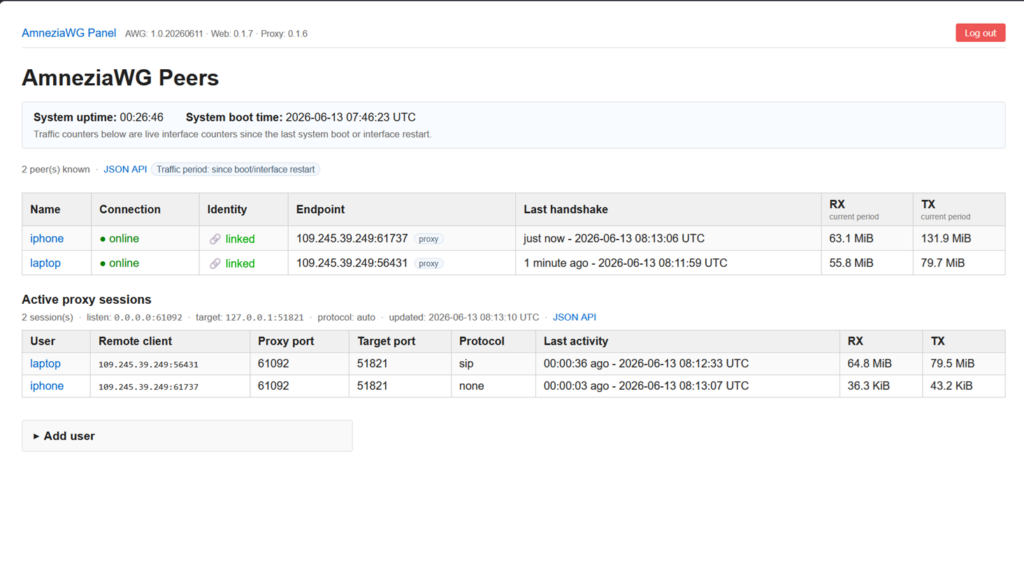
AmneziaWG web panel. At the top, you can see component versions and server uptime. Below that is a list of peers, the last handshake, and RX/TX counters. A separate Active proxy sessions block shows real proxy sessions: remote client address, proxy port, target port, detected protocol, and last activity time.
The screenshot shows two active sessions: one detected as sip, the other as none. This is a good example of auto mode: some clients can use full protocol imitation, while others go through ordinary AmneziaWG forwarding without a recognized mask.
Previously, this kind of picture would have had to be assembled manually: checking logs, running tcpdump, and matching addresses and ports. Now the main details are available directly from the browser.
Of course, the web panel does not replace proper diagnostics. If you need to understand exactly what is happening on the wire, tcpdump and Wireshark will still be useful. On the client side, the WireSock Secure Connect console is useful as well: it can record tunnel traffic into PCAP files, which can later be opened and analyzed in Wireshark. But for everyday monitoring, the web panel is still noticeably more convenient than constantly working with logs and traffic dumps.
Why This Matters
There is no final victory in the fight against DPI. This is not an area where you can come up with one elegant trick and close the topic forever.
Any widespread method will eventually be studied. First, a filter recognizes WireGuard by obvious handshake features. Then, when obfuscation and random junk appear, it starts looking more broadly: at timings, volumes, repetition, session behavior, and reactions to active checks. If a particular imitation becomes widespread, it will be analyzed too.
So the main question is not whether traffic can be made absolutely undetectable. Most likely, it cannot. Something else is much more important: how expensive and risky it becomes to single it out.
Blocking clean WireGuard is relatively simple. Blocking suspicious UDP noise is also possible, especially in an aggressively filtered network. But starting to block traffic that looks convincingly enough like QUIC, DNS, STUN, or SIP is already harder. It can affect real services, break applications, create false positives, and lead to complaints.
This is where protocol imitation raises the bar. It does not make the tunnel invisible, but it changes the economics of detection: distinguishing such traffic from legitimate traffic becomes more difficult, more expensive, and riskier in terms of side effects.
Limitations Worth Stating Up Front
I do not want this article to read like a promise that “everything now works everywhere.” That is not how things work.
Effectiveness always depends on the specific network. DPI is configured differently by different operators. In some places, hiding the handshake is enough. In others, junk helps. Somewhere else, full imitation is needed. And in some cases, the selected mode may provide no noticeable benefit at all. There are also scenarios where protocol imitation cannot help in principle: for example, networks based on allowlists, where only preapproved addresses or services are allowed, as well as direct blocking of the server’s IP address.
In such cases, traffic can look as much like QUIC, DNS, STUN, or SIP as it wants, but that will not change the network policy itself. There is no universal profile that works equally well under all conditions.
Every imitation leaves a behavioral trace. Even if a single datagram cleanly parses as DNS, QUIC, STUN, or SIP, timings, volumes, session duration, packet size distribution, and reactions to repeated checks remain. A real DNS server, a real SIP service, and a VPN tunnel masked as one of them may look similar at the level of a single packet, but they do not have to behave identically over a long session.
The proxy is not free in terms of resources either. It is an additional userspace layer: it accepts UDP, maintains sessions, responds to probe packets, rewrites padding, and forwards traffic further. For a home VPS or a small installation, the overhead will most likely be acceptable. But at speeds around a gigabit, it is already worth looking at CPU usage, system calls, and scaling across cores.
The Wireshark screenshots in this article should also be interpreted correctly. They show that the traffic cleanly parses as the selected protocol. This is an important part of the task, but not proof of undetectability. Real DPI can look not only at one packet, but also at the behavior of the flow as a whole.
Finally, this is dual-use technology. It is useful for privacy, access to your own servers, and connection resilience in networks with aggressive filtering. But, like almost any networking tool, it can be used in different ways. That choice remains the responsibility of the person using it.
Instead of a Conclusion
In short, the evolution looks like this.
First, people tried to hide WireGuard from DPI behind noise before the handshake. Then AmneziaWG appeared and began changing the protocol’s own features: headers, sizes, and junk inside the handshake. AmneziaWG 2.0 gave more room for controlled inserts through S1–S4, including in the main data stream.
The next step suggested itself. If a packet already has space that can be controlled, that space can be filled not with random bytes, but with the structure of another protocol.
This is exactly where the “imitation game” begins.
WireGuard on the wire should not look like WireGuard, but like ordinary QUIC, DNS, STUN, or SIP. Imitation is no longer limited to a few packets before the handshake. The selected mask is preserved in the working stream as well, while the server responds to probe packets the way a real service would.
In this scheme, WireSock Secure Connect 3.5+ handles the client side, while amneziawg-proxy covers the server side: it responds to probe packets, masks the response stream, and helps assemble a plausible picture on both sides of the tunnel.
The match against DPI, of course, does not end here. This is just another move in a long game. But in my opinion, it is a logical move: from the idea of “hiding VPN in randomness,” we are gradually moving toward a more mature idea, where the tunnel becomes part of the expected network landscape.
The described project is an independent community development and is not affiliated with Amnezia, amnezia.org, the Amnezia VPN application, or the Amnezia Free VPN service. It uses the open AmneziaWG protocol and related tools. The names “Amnezia,” “AmneziaWG,” and related trademarks belong to their respective owners and are used here for identification purposes only.