

On April 8, 2026, WireSock Secure Connect 3.4.4 was released as the first official version in the 3.x branch.
For us, this is more than just another update. It marks a transition to a new architectural foundation, one with clearer separation between components, stronger isolation, and new capabilities that both everyday users and administrators have been asking for for quite some time.
At the same time, the product has inevitably become more sophisticated. There are more settings, more deployment scenarios, and more edge cases to account for. That complexity was not added for its own sake. It reflects the reality of today’s networking environment and the growing demand for VPN tools that can remain reliable under increasingly restrictive and unpredictable conditions.
In this article, I want to go beyond the release notes and talk about the changes that may not be obvious at first glance, but best explain why WireSock Secure Connect 3.x had to evolve the way it did.
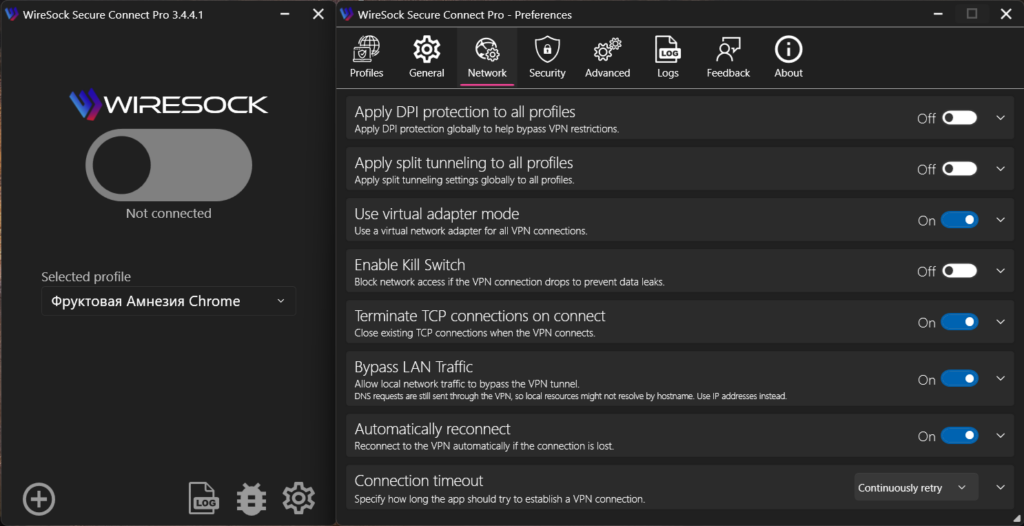
New Architecture
One of the most common criticisms of the official WireGuard client on Windows is how difficult it can be to activate a connection for users without elevated privileges. The reason is straightforward: creating and configuring network interfaces in Windows typically requires administrative rights, or delegated permissions associated with the built-in Network Configuration Operators group.
WireSock has long mitigated part of this problem with its so-called transparent mode. In this mode, packets are intercepted by the network driver, encrypted and decrypted with IP address translation, and routed without creating or configuring a separate virtual adapter.
In practice, this made VPN deployment much easier in environments where users do not have local administrator rights and where even prompting for elevation can be a problem.
Still, this only solved part of the issue. In virtual adapter mode, WireSock, including the 2.x series, faced the same architectural limitation as the official WireGuard client: elevated privileges were still required.
The logical next step was to split the application into two parts: a privileged service layer responsible for system-level operations, and a client layer responsible for configuration and tunnel management.
In our view, this significantly improves usability. VPN connections can now be established before a user signs in, the UI no longer needs to stay open all the time, and users can close it entirely and only launch it when needed. On top of that, the new architecture enabled a dedicated CLI tool for working with background services and brought proper command-line workflows to the platform.
Of course, this approach also raised questions. From the user’s perspective, the reaction is understandable: I closed the VPN app, so why are services still running in the background? That naturally led to suggestions to add service start and stop controls to the UI. But doing so would bring us right back to the very issue we were trying to solve: the interface would once again need to be tied to privileged operations and effectively run with administrator rights.
Yes, this model may feel unfamiliar at first. But the separation is exactly what makes the new architecture valuable. It reduces unnecessary dependence on elevated privileges and allows WireSock to operate not as a monolithic desktop app with UI and networking logic tightly coupled together, but as a more mature system with clearly separated interface, services, and VPN connection layers. That is the direction in which we want WireSock to continue evolving – first and foremost as a robust enterprise-ready solution.
KillSwitch / Network Lock
This is one of the features users had been asking us for, consistently and for a long time. Earlier versions already offered something similar, but only in virtual adapter mode, where the implementation was conceptually close to that of the original WireGuard client and relied on the routing table. That approach was never ideal, and in transparent mode it simply could not provide the same guarantees.
In WireSock Secure Connect 3.x, KillSwitch is implemented at the NDIS filter level. In other words, it is now enforced by a lower-level and much stricter blocking mechanism. This allows KillSwitch to be configured to block all traffic not only when the VPN tunnel drops, but also if a background service crashes or during profile switching.
At first glance, this may seem like a straightforward feature. In reality, it is one of the most important safeguards for any scenario where traffic leaks are unacceptable, whether that means remote work, access to internal corporate systems, operating in heavily restricted networks, or simply making sure applications never bypass the tunnel, even briefly.
There is also one less obvious detail worth mentioning. In strict KillSwitch mode, where blocking remains in place even after the tunnel disconnects, reconnecting can become more difficult if the VPN server endpoint is defined as a domain name rather than an IP address. The reason is simple: while blocking is active, the client may not be able to resolve that hostname via DNS, which in turn prevents it from re-establishing the connection.
We have done a great deal to make this smoother in practice. WireSock caches IP addresses, and when switching between profiles it will resolve domain names through an existing tunnel whenever possible. Even so, this is an important behavior to keep in mind, especially when using strict blocking policies with DNS-based endpoint configurations.
Global Split Tunneling: One Setting Instead of a Tangle of Exceptions
This is another long-requested feature. Before version 3.x, split tunneling rules had to be configured separately for every profile. Over time, that often turned into a surprisingly frustrating source of operational clutter.
For many users, the actual list of exceptions barely changed from one profile to another. Servers, countries, and connection settings might vary, but the applications, addresses, or routes that needed to bypass the tunnel, or be forced through it, often remained exactly the same.
As a result, identical settings had to be duplicated manually across multiple profiles, users had to keep them in sync, and every adjustment came with the risk that one profile would be overlooked.
That is why in version 3.x split tunneling can now be configured globally, once for the entire application, and then applied consistently across all profiles.
In a changelog, this can look like a small convenience feature. In reality, it has a much broader impact: less duplication, fewer inconsistencies between profiles, and much more predictable client behavior overall.
AmneziaWG 2.0 Support
This is yet another capability users had been asking for for quite a while. As mentioned in earlier posts, WireSock Secure Connect is built on Cloudflare’s WireGuard implementation, BoringTun. From a performance standpoint, it has a clear advantage over WireGuard-Go-based forks, including the one used by the original Amnezia client for Windows.
Support for H1-H4 packet tag ranges was added directly to our BoringTun fork, while S1-S4 parameters are handled within WireSock itself. Going forward, we plan to take this further and improve the realism of the obfuscation layer, eventually moving from randomly generated inserts toward traffic patterns that more closely resemble real network protocols.
At the same time, we also made some design choices of our own. To be honest, the I1-I5 parameter model always felt overly complicated for the average user. Capturing a binary packet dump in Wireshark and then manually embedding it into a configuration file may be interesting from an engineering perspective, but it is difficult to call that user-friendly.
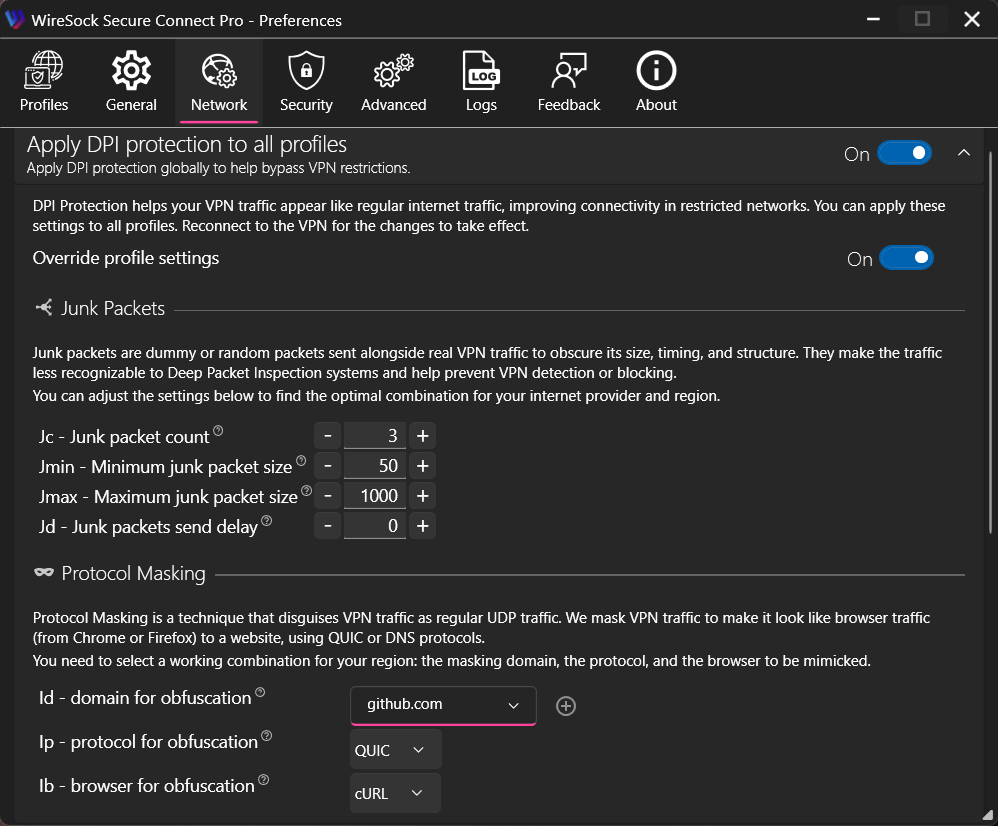
That is why WireSock takes a different approach. Instead of I1-I5, we introduced our own parameters for imitation packet generation: Id, Ip, and Ib – domain, protocol, and browser profile. At the moment, QUIC and DNS masking profiles are supported, and we plan to expand that list over time.
In practice, this model is easier to understand and more useful to work with. It replaces a collection of abstract numeric parameters with a configuration model that is much closer to how people actually think about traffic shaping and protocol impersonation.
CLI: Two Different Tools for Two Different Roles
Version 3.x also brings an important change to the command-line tooling. The minimalist console client that has existed since the earliest WireSock releases is now distributed separately as part of the SDK installer, while the new architecture introduces another CLI specifically for managing background services.
This separation better reflects the actual role of the original console client. Starting from version 2, it had become less of an alternative to the main UI and more of a backend component for tools such as TunnlTo and SplitWire-Turkey, as well as a foundation for lightweight deployment scenarios and third-party integrations.
There was very real demand for that kind of minimalist client. At one point, Microsoft even approached us with crash telemetry showing tens of millions of related events. That obviously sounded alarming at first, but the underlying issue turned out to be fairly harmless: after shutdown, the client was attempting to write to the log. The fix was simple, and the incident ended up being more amusing than alarming, but it also illustrated just how widely the tool was being used in real-world scenarios.
The new CLI introduced in version 3.x serves a different purpose. While the original console client was primarily aimed at headless usage and integration, the new tool is part of the WireSock Secure Connect service architecture and is designed specifically for managing background services from the command line.
In practical terms, this means that connecting, disconnecting, and managing profiles can now be done without the UI and without workarounds. For automation, scripting, and users who simply prefer a more minimal operating model, this was a natural next step.
Where to Get It
In recent years, for many users the question of where to download software has become almost as practical as the question of what is new in it.
For installation via winget, the main client is published as NTKERNEL.WireSockVPNClient, while the minimalist console client is available as NTKERNEL.WireSockVPNClientCLI. Separate downloads for Secure Connect and the SDK are also available from the WireSock website.
As always, we also try to make the latest releases easy to access through our official channels whenever possible.
In Closing
If there is one idea that ties all of this together, it is this: WireSock Secure Connect 3.x became more sophisticated not for the sake of complexity, but because the environment it operates in has become more demanding. Behind the release notes is not just a list of new features, but an effort to make the product more resilient in scenarios that only a few years ago would have seemed rare, advanced, or highly specialized.
As always, we welcome feedback, comments, and bug reports. They all help us move the product in the right direction.
Thank you for using WireSock.