
In this 2018 customer investigation, a customer reported that WinpkFilter installation failed with error 0x800700b7. It was the first such report I had seen, so I traced the installation steps with them.
0x800700b7 is the HRESULT form of Win32 ERROR_ALREADY_EXISTS. I first checked whether the driver was already installed. It was not, so we examined the component identities used by the installer.
The customer’s netcfg.exe command still used WinpkFilter’s default component ID, nt_ndisrd. The FILTER_UNIQUE_NAME in common.h and NetCfgInstanceId GUID {CD75C963-E19F-4139-BC3B-14019EF72F19} in ndisrd_lwf.inf were also unchanged. Only the driver image had been renamed. A derived driver with those unchanged identities can collide with the standard WinpkFilter build or another derivative using the same values. Although the customer had not installed the standard runtime, another conflicting component could still be present. We looked for the owner of the ID.
The netcfg.exe output associated nt_ndisrd with the Intel Technology Access Filter Driver and its ndisrfl.sys binary, as shown below:
netcfg -v -s nt_ndisrd
Network Services
-----------------
ms_netbios NetBIOS Interface
...
ms_wfplwf_upper WFP 802.3 MAC ? LightWeight ???
nt_ndisrd Intel(R) Technology Access Filter Driver
...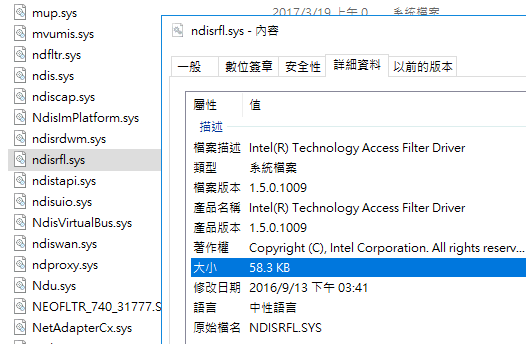
The excerpt from the customer’s netrfl.inf shows the collision. The service name ndisrd and component ID nt_ndisrd had not been customized; I would have expected names such as ndisrfl and nt_ndisrfl. Its NetCfgInstanceId also matched the original WinpkFilter GUID.
;
; Copyright (C), Intel Corporation. All rights reserved.
; ********************************************************************************
; ** Filename: netrfl.inf
; ** Abstract: Windows* INF File for Intel(R) Technology Access Filter Driver
; ********************************************************************************
;
[version]
Signature = "$Windows NT$"
Class = NetService
ClassGUID = {4D36E974-E325-11CE-BFC1-08002BE10318}
Provider = %INTEL%
CatalogFile=ndisrfl.cat
DriverVer=07/09/2015,1.5.0.1009

[Manufacturer]
%INTEL%=Ntkr,NTx86,NTia64,NTamd64

[Ntkr.NTx86]
%ndisrfl_Desc%=Install, nt_ndisrd

[Ntkr.NTia64]
%ndisrfl_Desc%=Install, nt_ndisrd

[Ntkr.NTamd64]
%ndisrfl_Desc%=Install, nt_ndisrd

; --------------------------------------------------------
; Installation Section
; --------------------------------------------------------
[Install]
AddReg=Inst_Ndi
Characteristics=0x40000
NetCfgInstanceId="{CD75C963-E19F-4139-BC3B-14019EF72F19}"
Copyfiles = ndisrd.copyfiles.sys
DelFiles = ndisrd.delfiles.sys

[SourceDisksNames]
1=%ndisrfl_Desc%,"",,

[SourceDisksFiles]
ndisrfl.sys=1

[DestinationDirs]
DefaultDestDir=12
ndisrd.copyfiles.sys=12

[ndisrd.copyfiles.sys]
ndisrfl.sys,,,2

[ndisrd.delfiles.sys]
ndisrfl.sys

; --------------------------------------------------------
; Ndi installation support
; --------------------------------------------------------
[Inst_Ndi]
HKR, Ndi,Service,,"ndisrd"
HKR, Ndi,CoServices,0x00010000,"ndisrd"
HKR, Ndi,HelpText,,%ndisrfl_HelpText%
HKR, Ndi,FilterClass,, compression
HKR, Ndi,FilterType,0x00010001,0x00000002
HKR, Ndi\Interfaces,UpperRange,,"noupper"
HKR, Ndi\Interfaces,LowerRange,,"nolower"
HKR, Ndi\Interfaces, FilterMediaTypes,,"ethernet,wan,tunnel,ppip"
HKR, Ndi,FilterRunType, 0x00010001, 1 ;this filter must run before any protocol can bind to the below miniport

; --------------------------------------------------------
; Service installation support
; --------------------------------------------------------
[Install.Services]
AddService=ndisrd,,ndisrd_Service_Inst

[ndisrd_Service_Inst]
DisplayName = %ndisrfl_Desc%
ServiceType = 1 ;SERVICE_KERNEL_DRIVER
StartType = 1 ;SERVICE_SYSTEM_START
ErrorControl = 1 ;SERVICE_ERROR_NORMAL
ServiceBinary = %12%\ndisrfl.sys
LoadOrderGroup = NDIS
Description = %ndisrfl_Desc%

[Strings]
INTEL = "Intel Corporation"
ndisrfl_Desc = "Intel(R) Technology Access Filter Driver"
ndisrfl_HelpText = "Intel(R) Technology Access Filter Driver"
This INF is evidence from the customer investigation, not an installation template. The reused component ID, service name and GUID explain the collision; the binary itself had been renamed.
To avoid such issues, please carefully read and follow the WinpkFilter build and customization guide. Also, please note that for the Developer license customers, we provide one custom build of WinpkFilter drivers at no extra cost.