
In the case of c# (NdisApiDemo), the CPU usage is high when the program is compi
Tagged: [email protected]
- This topic has 8 replies, 2 voices, and was last updated 1 year, 7 months ago by
cloud.
-
AuthorPosts
-
March 5, 2025 at 10:26 am #13972
cloud
ParticipantIn the case of c# (NdisApiDemo), the CPU usage is high when the program is compiled and run
March 5, 2025 at 10:29 am #13973Participantprivate static unsafe void PassThruUnsortedThread
(
NdisApi filter,
WaitHandle[] waitHandles,
IReadOnlyList<AutoResetEvent> waitHandlesManualResetEvents)
{
const int bufferSize = 32;var buffers = new IntPtr[bufferSize];
for (int i = 0; i < buffers.Length; i++)
{
buffers[i] = (IntPtr)filter.CreateIntermediateBuffer();
}while (true)
{
WaitHandle.WaitAny(waitHandles);
uint packetsSuccess = 0;while (filter.ReadPacketsUnsorted(buffers, bufferSize, ref packetsSuccess))
{
for (int i = 0; i < packetsSuccess; i++)
{
EthernetPacket ethPacket = buffers[i].GetEthernetPacket(filter);
if (ethPacket.PayloadPacket is IPv4Packet iPv4Packet)
{
if (iPv4Packet.PayloadPacket is TcpPacket tcpPacket)
{
//Console.WriteLine($”{iPv4Packet.SourceAddress}:{tcpPacket.SourcePort} -> {iPv4Packet.DestinationAddress}:{tcpPacket.DestinationPort}.”);
}
}
}if (packetsSuccess > 0)
{
filter.SendPacketsUnsorted(buffers, packetsSuccess, out uint numPacketsSuccess);
}
}
}
}
}The demo has high CPU usage
c# 调用驱动的时候,16核心cpu 占用16%
March 5, 2025 at 10:44 am #13974Vadim Smirnov
KeymasterThe high CPU usage is likely due to the fact that the packet event is never reset. This causes the thread to continuously poll the driver without pausing.
Solution:
You need to reset theAutoResetEventorManualResetEventinwaitHandlesManualResetEventsafter processing packets. This ensures the thread properly waits for new packets instead of running in a tight loop.Fixed Code:
private static unsafe void PassThruUnsortedThread
(
    NdisApi filter,
    WaitHandle[] waitHandles,
    IReadOnlyList<AutoResetEvent> waitHandlesManualResetEvents)
{
    const int bufferSize = 32;
    var buffers = new IntPtr[bufferSize];

    for (int i = 0; i < buffers.Length; i++)
    {
        buffers[i] = (IntPtr)filter.CreateIntermediateBuffer();
    }

    while (true)
    {
        int eventIndex = WaitHandle.WaitAny(waitHandles);  // Wait for an event to be signaled

        uint packetsSuccess = 0;

        while (filter.ReadPacketsUnsorted(buffers, bufferSize, ref packetsSuccess))
        {
            for (int i = 0; i < packetsSuccess; i++)
            {
                EthernetPacket ethPacket = buffers[i].GetEthernetPacket(filter);
                if (ethPacket.PayloadPacket is IPv4Packet iPv4Packet)
                {
                    if (iPv4Packet.PayloadPacket is TcpPacket tcpPacket)
                    {
                        // Console.WriteLine($”{iPv4Packet.SourceAddress}:{tcpPacket.SourcePort} -> {iPv4Packet.DestinationAddress}:{tcpPacket.DestinationPort}.”);
                    }
                }
            }

            if (packetsSuccess > 0)
            {
                filter.SendPacketsUnsorted(buffers, packetsSuccess, out uint numPacketsSuccess);
            }
        }

        // Reset the event to allow proper waiting
        if (eventIndex >= 0 && eventIndex < waitHandlesManualResetEvents.Count)
        {
            waitHandlesManualResetEvents[eventIndex].Reset();
        }
    }
}
Explanation:
- Wait for an event:
WaitHandle.WaitAny(waitHandles);ensures the thread only runs when a packet event is signaled. - Process packets normally: The loop reads packets, processes them, and sends them back.
- Reset the event: After processing packets,
waitHandlesManualResetEvents[eventIndex].Reset();is called to prevent continuous polling.
This should significantly reduce CPU usage.
March 5, 2025 at 3:24 pm #13975ParticipantThank you
if (eventIndex >= 0 && eventIndex < waitHandlesManualResetEvents.Count) { waitHandlesManualResetEvents[eventIndex].Reset(); }
waitHandlesManualResetEvents[eventIndex]
Array index out of bounds
此处代码会出现数组索引越界
March 7, 2025 at 9:34 am #13976KeymasterThank you for pointing that out. I made an incorrect assumption about the parameters, but I believe you understood the main idea correctly—when there are no packets to read, the packet events should be reset, and the thread should wait on them. I appreciate the clarification!
March 18, 2025 at 8:45 am #13999ParticipantWith your team’s technical guidance, my C# application integrating your driver has successfully reduced CPU utilization and is running stably. However, under the current operational parameters (20Mbps uplink/30Mbps downlink), the CPU utilization rate remains between 5%-10%. Are there any additional optimization methods to further reduce the software’s CPU resource consumption?
March 18, 2025 at 8:48 am #14000Participant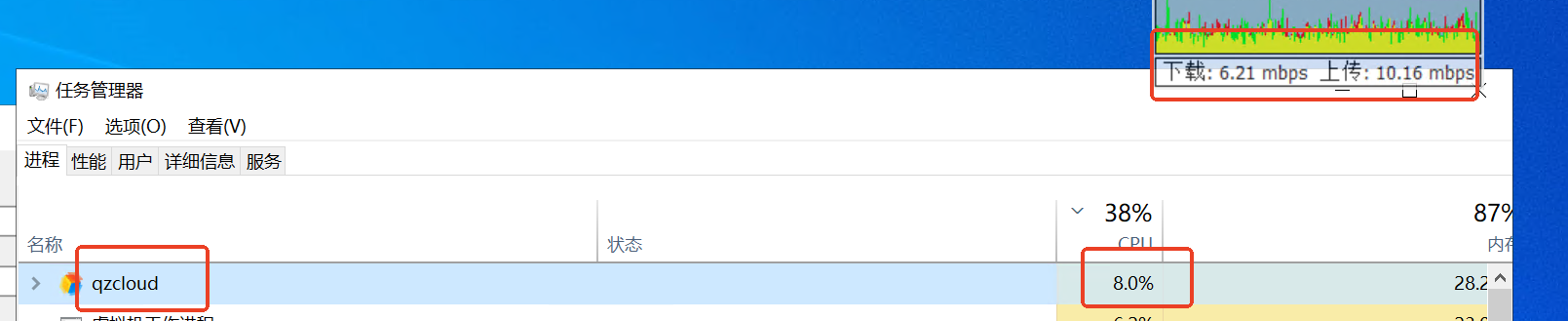 March 21, 2025 at 10:51 am #14001Keymaster
Thank you for the update — I’m glad to hear that the integration is running stably and that you’ve already achieved a noticeable reduction in CPU usage.
Performance tuning is a nuanced and context-dependent task. To explore further optimization opportunities, I would recommend using a tool like the Visual Studio Profiler to analyze where the application is spending the most CPU time. This will provide valuable insights into any remaining bottlenecks that could be addressed.
That said, if the goal is to reduce CPU usage to near-zero levels, it’s worth noting that some processing overhead is inevitable — even with relatively modest network loads such as 20Mbps uplink and 30Mbps downlink. Still, profiling should give us a clear picture of what’s realistically achievable in your setup.
March 25, 2025 at 7:39 am #14002ParticipantThank you
- Wait for an event:
-
AuthorPosts
- You must be logged in to reply to this topic.