
Windows Packet Filter (WinpkFilter) is a high-performance packet filtering framework designed for Windows that enables developers to efficiently filter (inspect and modify) raw network packets at the NDIS level of the network stack with minimal impact on network activity. This is achieved without the need for writing any low-level driver code.
Windows Packet Filter framework includes NDIS 3.1/4 hooking VxD driver for Windows 95/ME, NDIS 4 hooking filter driver for Windows NT/2000/XP, NDIS 5 Intermediate for Windows XP/2003, and NDIS 6 Lightweight Filter (LWF) drivers for Windows Vista and later. Additionally, it comes with a companion user-mode API DLL and sample code.
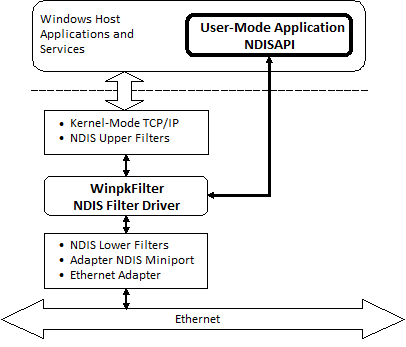
One of the key benefits of using Windows Packet Filter in comparison to other packet filtering frameworks for Windows, such as those based on the Windows Filtering Platform (WFP) callout drivers, Layered Service Providers (LSP), TDI filters, etc., is its ability to manipulate raw Ethernet frames by installing the driver below all network protocol drivers and just above the network interface driver. This gives the WinpkFilter driver ultimate control over all network traffic flow entering and leaving the system, allowing you to modify any packet, drop it, or even forge and insert a new one. With Windows Packet Filter, there’s no need to have experience in kernel-mode programming, as it provides a powerful user-level API. However, if you need to improve performance by implementing your solution in kernel mode, you can do so by directly adding your functional code to the Windows Packet Filter driver’s code.
System Requirements
| Windows 95/98/Millennium | Windows Server 2008* | Windows Server 2012 R2 |
| Windows NT 4.0 | Windows 7 | Windows 10 |
| Windows 2000 | Windows Server 2008 R2 | Windows Server 2016 |
| Windows XP | Windows 8 | Windows Server 2019 |
| Windows Server 2003 | Widows Server 2012 | Windows 11 |
| Windows Vista* | Windows 8.1 | Windows Server 2022 |
The following connections types are supported for the operating systems above:
- Wired Ethernet (802.3)
- Wi-Fi (802.11)
- WAN (Analog/ISDN modems, PPPoE, 3G/4G mobile modems)
- Mobile Broadband (PPIP)
- VPN network interfaces (WinTun, WireGuard etc.)
Product features
- Windows Packet Filter has been confirmed for its reliability and stability by hundreds of satisfied customers, ranging from small shareware companies to well-known corporations, since its launch in 2002.
- It boasts high performance, allowing for seamless handling of Gigabit network bandwidth in user-mode applications without any noticeable degradation in performance.
- It is completely portable across all Windows desktop platforms and operates on RAS/PPP adapters, as well as supporting Windows 7 Mobile Broadband stack (PPIP).
- It offers both passive network listening (packet collection) and active filtering (with the ability to edit or drop packets) modes.
- There is also an interface for injecting raw Ethernet frames into the network stack, in both directions from TCP/IP to the network and vice versa.
- The support for MTU decrement (setting system-wide MTU decrement) is useful for adding additional headers to IP packets, such as for IP in IP packet tunneling, IPSEC-based VPN, and so on.
- The powerful built-in network filters engine allows you to set rules to pass, block, or redirect network packets to a Windows Packet Filter-based application for further processing.
Applicability/Usage Scope
Windows Packet Filter can be used as a foundation for various types of network applications, including but not limited to:
- User-mode firewall and content filtering solutions, eliminating the need to write kernel-mode drivers.
- Kernel-mode firewall and content filtering solutions, which require kernel-mode programming skills and a Source Code license, but offer the maximum possible performance.
- Internet Connection Sharing (Network Address Translation) that can be implemented in either user or kernel mode, depending on performance requirements.
- Virtual Private Network solutions (IPSEC, SSL VPN, WireGuard, etc.) that can also be implemented in either user or kernel mode, depending on performance requirements.
- Network packet tunneling solutions, where packets captured from the network can be tunneled from the client to the remote system using SSL, SSH, HTTP, ICMP, etc. The remote host can extract the packets and inject them into the real network after modifying the required packet headers. Response packets can be returned to the client in the same manner, potentially bypassing certain network access limitations.
- Packet sniffer, allowing you to capture and inspect all packets sent and received by TCP/IP.
- IP shaping solutions, to limit bandwidth for Internet users.
- Network traffic counting and bandwidth management solutions.
- Wireless Firewall Gateways, even with HTTP authorization.
- Transparent proxy solutions based on NDIS level packet redirection, which can be used for tasks such as decrypting SSL (Man-In-The-Middle), parental content control, and e-mail SPAM filtering.
- Transparent filtering network bridges.
Windows Packet Filter Advanced Samples
The available example applications provided with Windows Packet Filter include:
- ProxiFyre – an advanced SOCKS5 Proxifier for Windows, expanding upon the base version of the Windows Packet Filter socksify demo below by introducing support for UDP and the capability to handle multiple proxy instances.
- Internet Gateway – a simple MFC application for Internet connection sharing.
- WAN Emulator – a console application that simulates Long Fat Network behavior.
- Capture Packet Filter – a native C++ example that intercepts and saves packets to a PCAP file.
- DNS Proxy Server – a native C++ example that redirects DNS protocol through a transparent UDP proxy.
- DNS Tracer – a native C++ example that intercepts and decodes DNS responses.
- Ethernet Bridge – a native C++ example that implements bridging wired and wireless networks.
- IPv6 Parser – a native C++ example that intercepts IPv6 packets and matches to the originating process.
- SNI Inspector – a native C++ example that intercepts network packets and extracts SNI from HTTPS and Host from HTTP packets.
- Socksify – a native C++ example that redirects selected TCP connections through a SOCKS5 proxy.
- UDP to TCP Converter – a native C++ example that demonstrates how to convert UDP packets to TCP and vice versa.
- Rebind – a native C++ example that demonstrates how to rebind outgoing TCP/UDP connections for the specified application from the default network interface to a different one.
- Hyperscan – a high-performance native C++ example showcasing the integration of the Hyperscan and llhttp libraries. This application intercepts network packets, parses them, detects HTTP protocol sessions, and applies the HTTP protocol parsing on the detected sessions using
llhttp. - PcapPlusPlus – native C++ example that leverages the PcapPlusPlus library to intercept network packets, specifically focusing on extracting the Server Name Indication (SNI) from HTTPS packets. The program also performs Transport Layer Security (TLS) fingerprinting to identify the specific version of TLS being utilized.
- TestDotNet – a C# example that demonstrates the usage of the NDISAPI library in filtering scenarios.
These sample applications offer a great starting point for exploring the capabilities of Windows Packet Filter and can be used as a foundation for building your own custom network applications.
Support
Please ask questions in our support forum.
* – due to EOL of SHA-1 code signing on December 1, 2020, it is no longer possible to sign drivers for Windows Vista/2008. To run Windows Packet Filter on these operating systems, you will need to use the Disable Driver Signing Enforcement option.