
Sharing a connection is easy until you need something more specific: a second machine on the upstream IP network, a virtual adapter connected to a physical LAN, or your own filtering rules between two segments. Windows Packet Filter lets us examine and forward frames in user mode. The interesting part is understanding when forwarding a frame unchanged is enough, and when Wi-Fi makes us translate its hardware addresses.
Why build your own network bridge?
When I first wrote this article in 2016, more than a decade had passed since the original Ethernet Bridge tool. Inspired by Steve Gibson at Gibson Research Corporation, that earlier tool supported OpenVPN bridging on Windows 2000. Windows XP and later also provide a built-in Network Bridge, but a programmable forwarding path still has useful applications.
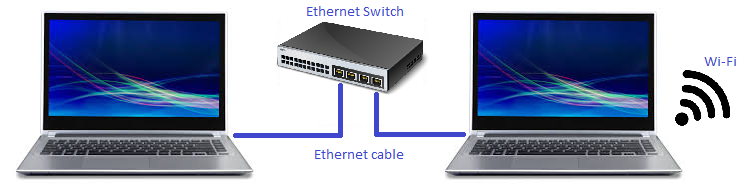
Consider two laptops joined by an Ethernet cable or switch. The first also has a Wi-Fi connection, and we want the second to use that network (Figure 1).
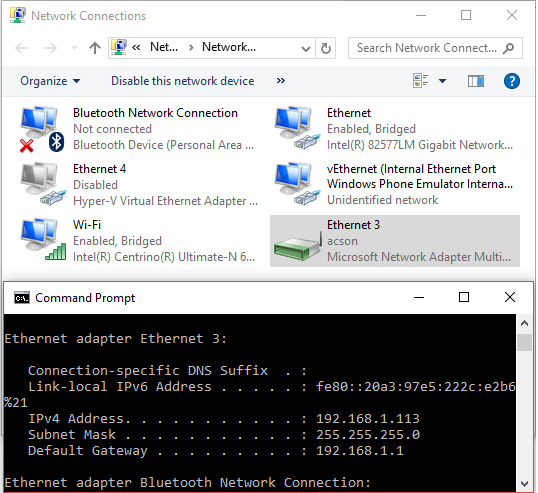
An IP-routing/NAT solution, such as Internet Connection Sharing or the Internet Gateway example, is one option. Here the aim is different: keep the downstream machine on the upstream IP network. Figures 2 and 3 show the built-in Windows Network Bridge in the original setup, with the Ethernet and Wi-Fi connections joined under one bridge interface.
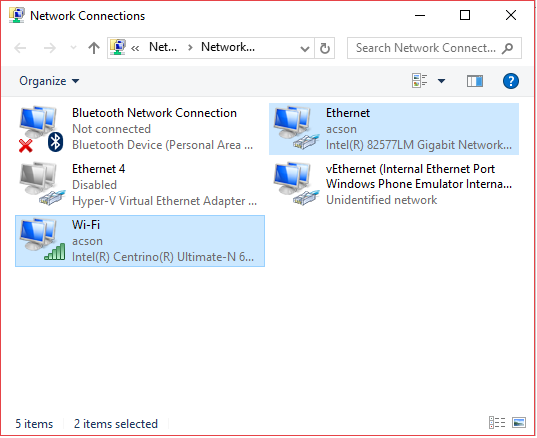
The next screenshots also belong to that original experiment. With Hyper-V enabled, I attached an external virtual switch to Wi-Fi; the host used the resulting vEthernet (WLAN) interface (Figure 4).
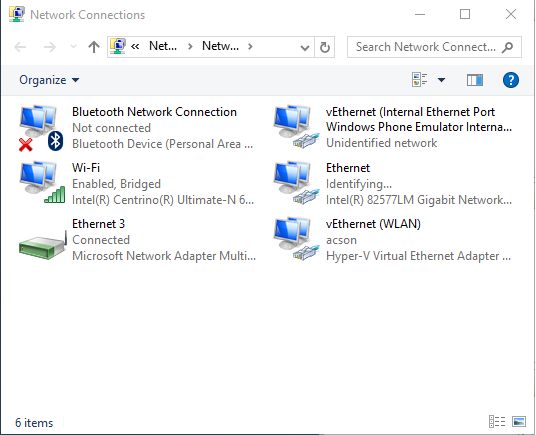
I then tried to add Ethernet and that virtual interface to a Network Bridge (Figure 5), expecting the second laptop to reach the same upstream network.
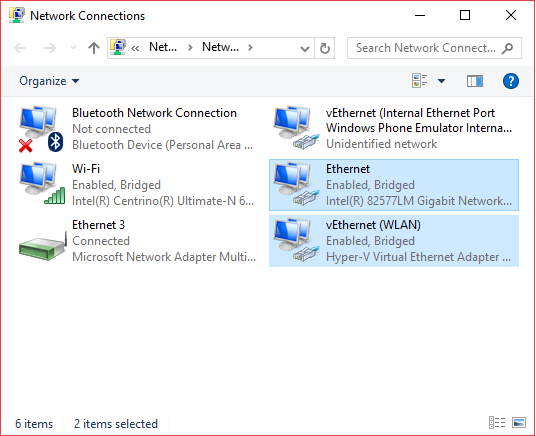
In that 2016 configuration, adding the bridge instead disconnected the first laptop. Removing the Hyper-V virtual switch restored connectivity. That result motivated the example. It applies to the 2016 Windows/NIC/AP setup and does not establish a limitation of current Hyper-V systems. For current switch configuration and management-OS sharing, use Microsoft’s Hyper-V virtual-switch guidance.
A custom bridge can also be useful when you want to:
- Connect a virtual interface such as VirtNet to a physical network.
- Inspect or filter frames before forwarding them between segments: the starting point for a bridging firewall.
- Explore how packet capture, forwarding and local-stack indications fit together.
Building a bridge with Windows Packet Filter
The NDISAPI Ethernet Bridge example is the source to start from when building an application. The implementation discussed here is pinned so you can compare its behavior with the two-interface API form used in the listings below. They are processing fragments, not a complete replacement for the current project.
The application needs an installed Windows Packet Filter driver. Use the repository’s build instructions and dependencies for the source revision you choose, then validate it with your adapters and topology. The discussion here separates ordinary Ethernet forwarding from the extra IPv4 MAC translation used by the Wi-Fi example.
Ethernet to Ethernet
For the two-interface example, one worker reads frames from each adapter and selects which ones to send through the other adapter. Promiscuous reception is used on Ethernet where supported. Frames intended for the local TCP/IP stack are handled separately from frames forwarded onto the other network.
The loopback checks below avoid some duplicate local indications. They do not implement Spanning Tree or protect a network with redundant paths. Keep this demonstration’s topology loop-free.
while (eBridgePtr->m_bIsRunning)
{
	Adapters[First]->WaitEvent(INFINITE);

	// Reset event, as we don't need to wake up all working threads at once

	if (eBridgePtr->m_bIsRunning)
		Adapters[First]->ResetEvent();

	// Start reading packet from the driver

	while (eBridgePtr->ReadPackets(ReadRequest))
	{

		for (size_t i = 0; i < ReadRequest->dwPacketsSuccess; ++i)
		{

			if (PacketBuffer[i].m_dwDeviceFlags == PACKET_FLAG_ON_SEND)
			{
				// For outgoing packets add to list only originated from the current
				// interface (to skip possible loopback indications)
				if(Adapters[First]->IsLocal(PacketBuffer[i].m_IBuffer + ETH_ALEN))
				{
					BridgeRequest->EthPacket[BridgeRequest->dwPacketsNumber].Buffer = &PacketBuffer[i];
					++BridgeRequest->dwPacketsNumber;
				}
			}
			else
			{
				// For incoming packets don't add to list packets destined to local
				// interface (they are not supposed to be bridged anythere else)
				if(!Adapters[First]->IsLocal(PacketBuffer[i].m_IBuffer))
				{
					BridgeRequest->EthPacket[BridgeRequest->dwPacketsNumber].Buffer = &PacketBuffer[i];
					++BridgeRequest->dwPacketsNumber;
				}
			}

			// For local indications add only directed or broadcast/multicast
			if ((PacketBuffer[i].m_IBuffer[0] & 0x01)
				|| Adapters[Second]->IsLocal(PacketBuffer[i].m_IBuffer)
				)
			{
				MstcpBridgeRequest->EthPacket[MstcpBridgeRequest->dwPacketsNumber].Buffer = &PacketBuffer[i];
				++MstcpBridgeRequest->dwPacketsNumber;
			}
		}

		if (BridgeRequest->dwPacketsNumber)
		{
			eBridgePtr->SendPacketsToAdapter(BridgeRequest);
			BridgeRequest->dwPacketsNumber = 0;
		}

		if (MstcpBridgeRequest->dwPacketsNumber)
		{
			eBridgePtr->SendPacketsToMstcp(MstcpBridgeRequest);
			MstcpBridgeRequest->dwPacketsNumber = 0;
		}

		ReadRequest->dwPacketsSuccess = 0;
	}
}
Notice the bound on the processing loop: dwPacketsSuccess. A ReadPackets request supplies room for dwPacketsNumber packets, but only dwPacketsSuccess entries contain the returned batch. Asking for 64 packets does not mean that 64 arrived. Every preprocessing and forwarding loop must respect the returned count.
Ethernet to Wi-Fi: translating hardware addresses
The Ethernet path above leaves frame contents unchanged. A Wi-Fi station connection cannot simply be assumed to carry every downstream machine’s hardware identity in the same way. This example therefore presents the wireless adapter’s MAC address upstream, while retaining the downstream clients’ IPv4 addresses. That is MAC address translation, rather than IP-address or port translation.
The reverse path needs the original client MAC address. The sample learns IPv4-to-MAC pairs from outgoing ARP traffic, then uses those pairs when processing incoming IPv4 packets and ARP replies. If no mapping exists, the shown lookup leaves the destination unchanged; it does not invent a destination or guarantee delivery.
| Direction | What changes | Why |
|---|---|---|
| LAN to Wi-Fi | Ethernet source MAC | Use the wireless adapter’s address upstream. |
| LAN to Wi-Fi: ARP | ARP sender hardware address | Learn the original IPv4/MAC pair before replacing the sender MAC. |
| Wi-Fi to LAN | Ethernet destination MAC for IPv4 frames; ARP reply target MAC | Restore a known downstream address from the mapping table. |
| LAN to Wi-Fi: DHCP | BOOTP/DHCP BROADCAST flag | Request broadcast server replies in the applicable DHCP states. |
Both translation loops use dwPacketsSuccess, the number of packets actually returned, just like the forwarding loop. Using the requested count, dwPacketsNumber, could process stale buffer entries when a read returns only a partial batch. The parser and protocol limits are discussed after the listing.
Wi-Fi processing loop: historical API form, returned packet count
while (eBridgePtr->m_bIsRunning)
{
	Adapters[First]->WaitEvent(INFINITE);

	// Reset event, as we don't need to wake up all working threads at once

	if (eBridgePtr->m_bIsRunning)
		Adapters[First]->ResetEvent();

	// Start reading packet from the driver

	while (eBridgePtr->ReadPackets(ReadRequest))
	{
		//
		// WLAN requires MAC NAT
		//
		if (Adapters[First]->IsWLAN())
		{
			// Process packets from WLAN:
			// Need to lookup correct MAC address for each packet by its IP address
			// and replace destination MAC address
			for (size_t i = 0; i < ReadRequest->dwPacketsSuccess; ++i)
			{
				ether_header_ptr pEtherHdr = reinterpret_cast<ether_header_ptr>(ReadRequest->EthPacket[i].Buffer->m_IBuffer);
				if (ntohs(pEtherHdr->h_proto) == ETH_P_IP)
				{
					iphdr_ptr pIpHdr = (iphdr*)(ReadRequest->EthPacket[i].Buffer->m_IBuffer + ETHER_HEADER_LENGTH);

					auto dest_mac = Adapters[First]->GetMacByIp(pIpHdr->ip_dst);
					if (!(dest_mac == mac_address::empty))
					{
						memcpy(pEtherHdr->h_dest, &dest_mac[0], ETH_ALEN);
					}
				}

				if (ntohs(pEtherHdr->h_proto) == ETH_P_ARP)
				{
					ether_arp_ptr pArpHdr = reinterpret_cast<ether_arp_ptr>(ReadRequest->EthPacket[i].Buffer->m_IBuffer + ETHER_HEADER_LENGTH);

					if (ntohs(pArpHdr->ea_hdr.ar_op) == ARPOP_REQUEST)
					{

					}
					else
					{
						auto dest_mac = Adapters[First]->GetMacByIp(*reinterpret_cast<in_addr*>(pArpHdr->arp_tpa));
						if (!(dest_mac == mac_address::empty))
						{
							memcpy(pEtherHdr->h_dest, &dest_mac[0], ETH_ALEN);
							memcpy(pArpHdr->arp_tha, &dest_mac[0], ETH_ALEN);
						}
					}
				}
			}
		}

		if (Adapters[Second]->IsWLAN())
		{
			// Process packets to WLAN:
			// Need to change source MAC to WLAN adapter MAC
			// and save pair IP->MAC for the future
			for (size_t i = 0; i < ReadRequest->dwPacketsSuccess; ++i)
			{
				ether_header_ptr pEtherHdr = reinterpret_cast<ether_header_ptr>(ReadRequest->EthPacket[i].Buffer->m_IBuffer);

				//
				// ARP processing. Here we save pairs of IP and MAC addresses for future use
				//
				if (ntohs(pEtherHdr->h_proto) == ETH_P_ARP)
				{
					ether_arp_ptr pArpHdr = reinterpret_cast<ether_arp_ptr>(ReadRequest->EthPacket[i].Buffer->m_IBuffer + ETHER_HEADER_LENGTH);

					if (ntohs(pArpHdr->ea_hdr.ar_op) == ARPOP_REQUEST)
					{
						// ARP request

						// Save pair of IP and MAC
						Adapters[Second]->SetMacForIp(
							*reinterpret_cast<in_addr*>(pArpHdr->arp_spa),
							&pArpHdr->arp_sha[0]
							);

						// Replace source MAC in ARP request to WLAN adapter one
						memmove(&pArpHdr->arp_sha[0], &Adapters[Second]->GetHwAddress()[0], ETH_ALEN);
					}
					else
					{
						// ARP reply

						// Save pair of IP and MAC
						Adapters[Second]->SetMacForIp(
							*reinterpret_cast<in_addr*>(pArpHdr->arp_spa),
							&pArpHdr->arp_sha[0]
							);

						// Replace sender MAC in ARP reply with WLAN adapter MAC
						memmove(&pArpHdr->arp_sha[0], &Adapters[Second]->GetHwAddress()[0], ETH_ALEN);
					}

				}

				//
				// DHCP: request broadcast replies when this BOOTREQUEST has flags == 0
				//
				if (ntohs(pEtherHdr->h_proto) == ETH_P_IP)
				{
					iphdr_ptr pIpHeader = reinterpret_cast<iphdr_ptr>(ReadRequest->EthPacket[i].Buffer->m_IBuffer + ETHER_HEADER_LENGTH);

					if (pIpHeader->ip_p == IPPROTO_UDP)
					{
						udphdr_ptr pUdpHeader = reinterpret_cast<udphdr_ptr>(((PUCHAR)pIpHeader) + sizeof(DWORD)*pIpHeader->ip_hl);
						if (ntohs(pUdpHeader->th_dport) == IPPORT_DHCPS)
						{
							dhcp_packet* pDhcp = reinterpret_cast<dhcp_packet*>(pUdpHeader + 1);

							if ((pDhcp->op == BOOTREQUEST) &&
								(pDhcp->flags == 0)
								)
							{
								// Request a broadcast DHCP server reply
								pDhcp->flags = htons(0x8000);
								RecalculateUDPChecksum(ReadRequest->EthPacket[i].Buffer);
								RecalculateIPChecksum(pIpHeader);
							}

						}
					}
				}

				// Replace source MAC in Ethernet header
				memmove(&pEtherHdr->h_source, &Adapters[Second]->GetHwAddress()[0], ETH_ALEN);

				// Mark packet as MAC NAT applied
				ReadRequest->EthPacket[i].Buffer->m_Reserved[0] = 1;
			}
		}

		for (size_t i = 0; i < ReadRequest->dwPacketsSuccess; ++i)
		{

			if (PacketBuffer[i].m_dwDeviceFlags == PACKET_FLAG_ON_SEND)
			{
				// For outgoing packets add to list only orginated from the current interface (to skip possible loopback indications)
				if(Adapters[First]->IsLocal(PacketBuffer[i].m_IBuffer + ETH_ALEN)||
					(Adapters[Second]->IsLocal(PacketBuffer[i].m_IBuffer + ETH_ALEN)))
				{
					BridgeRequest->EthPacket[BridgeRequest->dwPacketsNumber].Buffer = &PacketBuffer[i];
					++BridgeRequest->dwPacketsNumber;
				}
			}
			else
			{
				// For incoming packets don't add to list packets destined to local interface (they are not supposed to be bridged anythere else)
				if(!Adapters[First]->IsLocal(PacketBuffer[i].m_IBuffer))
				{
					BridgeRequest->EthPacket[BridgeRequest->dwPacketsNumber].Buffer = &PacketBuffer[i];
					++BridgeRequest->dwPacketsNumber;
				}
			}

			// For local indications add only directed or broadcast/multicast
			if ((PacketBuffer[i].m_IBuffer[0] & 0x01)
				|| Adapters[Second]->IsLocal(PacketBuffer[i].m_IBuffer)
				)
			{
				MstcpBridgeRequest->EthPacket[MstcpBridgeRequest->dwPacketsNumber].Buffer = &PacketBuffer[i];
				++MstcpBridgeRequest->dwPacketsNumber;
			}
		}

		if (BridgeRequest->dwPacketsNumber)
		{
			eBridgePtr->SendPacketsToAdapter(BridgeRequest);
			BridgeRequest->dwPacketsNumber = 0;
		}

		if (MstcpBridgeRequest->dwPacketsNumber)
		{
			eBridgePtr->SendPacketsToMstcp(MstcpBridgeRequest);
			MstcpBridgeRequest->dwPacketsNumber = 0;
		}

		ReadRequest->dwPacketsSuccess = 0;
	}
}
Why ARP and DHCP need extra attention
ARP carries hardware addresses inside its payload as well as in the Ethernet header. Rewriting only the outer source address would leave an upstream peer learning the wrong address for a downstream IPv4 client. On the outbound path, the example saves the original sender pair before substituting the wireless MAC. On an incoming ARP reply, it restores both the Ethernet destination and ARP target hardware address when it knows the target IPv4 address.
The DHCP block sets the BOOTP/DHCP BROADCAST flag on a BOOTREQUEST whose flags are zero. It does not rewrite the request’s IP/Ethernet destination or client hardware-address field. With giaddr and ciaddr both zero, that flag requests broadcast DHCPOFFER/DHCPACK replies under RFC 2131, section 4.1. A nonzero ciaddr can still lead to a unicast reply; relay handling differs too. Test initial lease acquisition, renewal and rebinding with the actual client/server combination. Do not rely on a guaranteed short-timeout fallback to broadcast.
What this example leaves to your application
The Wi-Fi translation shown here handles IPv4 and ARP. It does not implement IPv6 Neighbor Discovery translation: IPv6 carries link-layer information in its own discovery messages. VLAN-tagged frames also change the parsing layout; the listings do not decode those tags. Forwarding or rewriting an outer Ethernet header alone does not establish support for either case.
The historical fragments cast packet buffers directly to protocol headers. Before using this approach on untrusted traffic, validate m_Length, Ethernet type, IPv4 header/version/length fields, fragmentation, UDP length and the BOOTP fields you access. Respecting the returned packet count does not make those casts a complete packet parser.
A production bridge also needs deliberate handling of mapping lifetimes and conflicting/spoofed entries, failed or partial sends, shutdown and adapter removal, and network loops. The snippets omit that machinery. Their value is the forwarding and translation mechanism; a successful fragment test is not a compatibility test for a particular AP, NIC, Windows build or Hyper-V configuration.
Bridging VirtNet to Wi-Fi
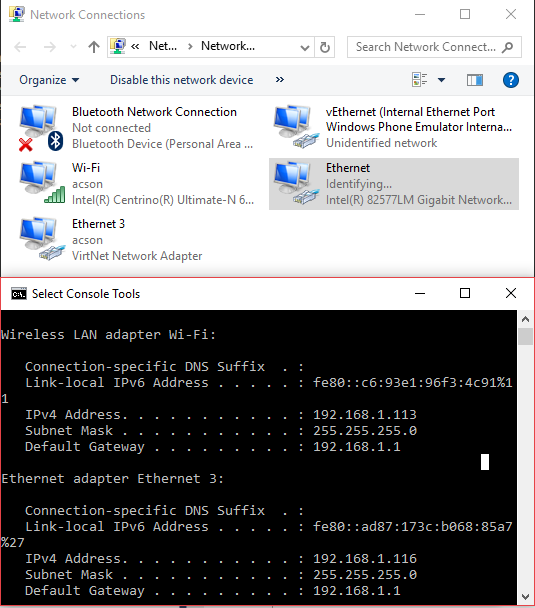
Figure 6 records the original VirtNet experiment: the virtual adapter obtained a DHCP lease through the Wi-Fi connection. That result applies to the illustrated setup; it does not establish compatibility with every virtual adapter or current Windows release. Check the chosen adapter, driver and addressing behavior in the topology you intend to support.
The useful starting point is small: read a batch, process only the packets returned, and keep track of the hardware identity each side expects. Ethernet forwarding and IPv4 Wi-Fi translation then become two explicit paths you can reason about and test, rather than one assumption that every network behaves like a wire.